Have you ever wondered what makes a great speech truly captivating? It’s not just the words you choose but the speed at which they flow. The magic lies in your words per minute (WPM) — the sweet spot where clarity meets engagement.
Whether you’re delivering a keynote, a persuasive pitch, or a heartfelt toast, mastering your speech’s pace can make all the difference between a message that resonates and one that fades away. Ready to unlock the secret to speaking with impact? Here’s a detailed breakdown to help you estimate the number of words for a 10-minute speech, a 5-minute speech, and a 3-minute speech.
What is words per minute (WPM)?
Words per minute (WPM) refers to the speed at which a person speaks, and it is the measure of the number of words spoken in one minute. It is essential in public speaking, presentations, and communication because it affects how well an audience understands and retains the information presented. There are three variations in speech rate: slow pace (around 100-120 WPM), normal pace (around 130-160 WPM), and fast pace (around 170-200 WPM).
💠According to a source, the average rate for English speakers in the United States is about 150 words per minute.
Why are words per minute important in a speech?
The speed at which someone talks can affect how well people understand and stay interested when you deliver a speech. People might feel overwhelmed if you speak too fast, but they might get bored and lose focus if you talk too slowly. Finding a good balance of words in a speech is important to ensure your message comes across clearly and keeps people engaged. The right number of words per minute can help with the following:
Comprehension: The correct rate of speech allows the audience to follow a speaker without feeling rushed or overwhelmed. The talking speed can have an impact on how the audience responds. Speaking too quickly can confuse people, while speaking too slowly may bore your audience.
Engagement: Varying the speech rate can help maintain audience interest. Faster speaking rates can be used for exciting points, while slower rates can emphasize essential details.
Time management: It's important to gauge how long your speech needs to be, especially if there are time constraints. For instance, a speaker who knows their WPM will be able to estimate how long it will take to deliver a 1,000-word speech.
What factors affect the words per minute of speech?
Different types of speeches require different speaking rates. Adjusting your words per minute based on the speech type, audience, and content is important for clear and engaging delivery. Some of the factors affecting the words per minute in a speech are:
Audience: When speaking, consider the audience's age, familiarity with the topic, and cultural background, as these factors can affect the optimal speaking rate. Young audience members or those unfamiliar with the subject may require a slower pace.
Content complexity: Complex or technical content often requires a slower WPM to ensure the audience can follow along and understand the material.
Purpose of the speech: The goal of the speech influences the ideal words you speak per minute. Informative speeches may benefit from a slower pace for absorption, while persuasive speeches may vary in speed for emphasis.
Speech duration: Longer speeches may require a more moderate pace to maintain audience engagement, while shorter speeches may accommodate a faster rate.
💡Pro tip: For a presentation with a senior manager, use a medium-paced, formal speech and an informal tone with a varied pace for an internal team presentation.
Words per minute for a 10 minute speech
A 10 minute speech is common for presentations, such as keynote addresses, conference talks, or class presentations. Check out the number of words that are ideal for different scenarios:
Slow pace (100-120 WPM) A 10-minute speech delivered slowly is around 1,000 to 1,200 words. Speaking slowly is ideal if you must explain complex concepts, use pauses effectively for emphasis, or ensure that every word is clearly understood. You can also experiment with talking fast or slow in certain sections of your speech to engage the audience. Examples: performance review meetings, client onboarding sessions, cross-department presentations, etc.
Normal pace (130-160 WPM) You should aim for an average speaking pace of around 1,300 to 1,600 words. This pace is most common for public speaking. It balances delivering enough information and keeping the audience engaged. Examples: quarterly financial presentation, strategy planning session, product launch briefing, etc.
Fast pace (170-200 WPM) Your 10-minute speech could contain 1,700 to 2,000 words if you talk fast. A high speaking rate may be appropriate for situations where you have a lot of content to cover. Still, it can be challenging for the audience to absorb all the information. Examples: crisis communication meetings, PR-conference briefings, market analysis presentations, etc.
Words per minute for a 5 minute speech
A 5 minute speech is often used for short speech or presentations, toasts, or brief introductions. Check out the number of words which are ideal for different scenarios:
Slow pace (100-120 WPM) A 5-minute speech would be around 500 to 600 words at a slow pace. This lets you articulate each word clearly and provide enough pauses for the audience to digest your points. Examples: team-building workshops, change management policies, client handover meetings, etc.
Normal pace (130-160 WPM) An average pace would mean your 5-minute speech should be approximately 650 to 800 words. This is ideal for delivering a concise yet informative speech that keeps the audience’s attention without feeling rushed. Examples: new employee orientation, negotiation meetings, shareholder meetings, etc.
Fast pace (170-200 WPM) Speaking quickly, you could deliver 850 to 1,000 words in a 5-minute speech. This might work well for energizing the audience or providing information quickly, but it may also risk overwhelming your listeners. Examples: daily stand-up calls, elevator pitches, task delegation meetings, etc.
Words per minute for a 3 minute speech
A 3 minute speech is commonly used for elevator pitches, quick summaries, or short personal stories. Check out the number of words which are ideal for different scenarios:
Slow pace (100-120 WPM) A 3-minute speech would consist of around 300 to 360 words at a slow pace. This is best when you must make a substantial impact with fewer words, allowing for emphasis and reflection. Examples: retirement celebrations, project updates to clients, change management briefings, etc.
Normal pace (130-160 WPM) For an average speaking rate, aim for 390 to 480 words. This range is ideal for delivering a concise, easy-to-follow, and understandable message. Examples: networking events, job interviews, quick project updates to investors, etc.
Fast pace (170-200 WPM) A fast-paced 3-minute speech could contain 510 to 600 words. This is suitable for highly dynamic presentations where you must convey enthusiasm or urgency. Examples: press briefings, competitive pitch rounds, crisis management updates, etc.
💡Tips for adjusting your speech length and pace
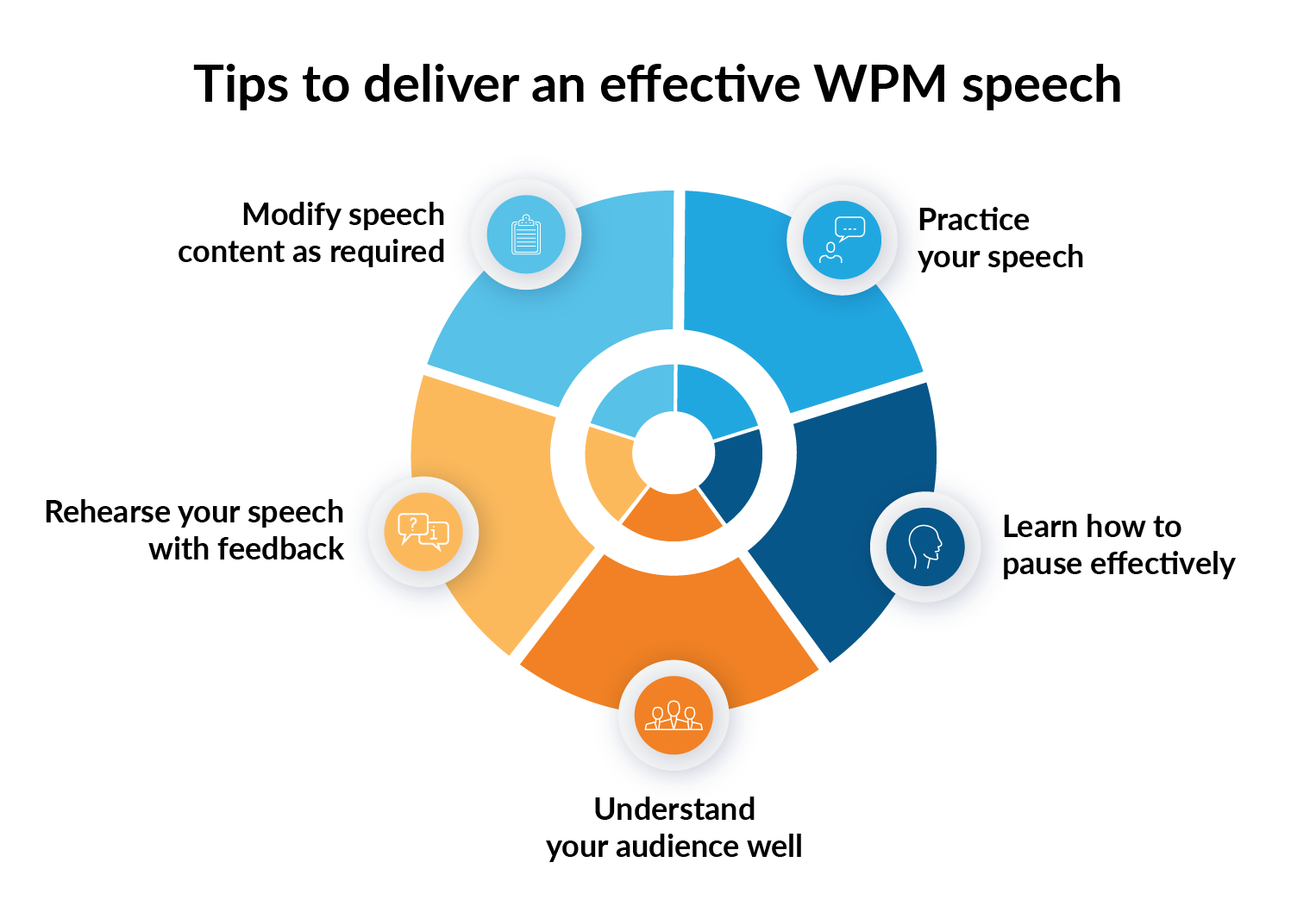
Make sure to practice the speed and rhythm of your speech. It's important to stay within the given time and communicate effectively. Without pace variation, it can get boring for the audience - be it short speeches or longer-form presentations. Here are some tips to deliver an effective speech:
Practice your speech delivery: Time yourself while reading your speech aloud to understand how many words you comfortably speak per minute. Practicing with a strict time limit will help with your final speech. Adjust your script accordingly to fit the desired time limit.
Use pauses effectively: Don’t rush through your speech to fill the time. Pauses are a great way to emphasize points, and give your audience time to process the information.
Know your audience:Consider the complexity of your content and your audience's familiarity with the topic. A more technical or detailed topic may require a slower rate.
Rehearse with feedback: Measure your speaking rate by practicing in front of others. Get feedback on your pacing, clarity, and overall delivery. Adjust your average speaking speed based on their input.
Include or exclude content as needed: If your speech is too long or short, consider trimming less important points or adding more detailed explanations to fit the desired time. Make sure the content is interesting for the audience.
How can Prezent help you maintain your presentation's ideal speaking rate?
It is always useful to have an estimate of the word count in a speech. Prezent enables you to leverage technology and enhance your presentations. It offers advanced features that can help you create visually compelling presentation slides and maintain the ideal word per minute naturally.
Structured templates for clarity: Prezent offers structured and pre-designed templates that help you organize your presentation content clearly and logically. These templates allow you to focus on key points without overwhelming each slide with too much information. This structure helps you maintain a steady pace, ensuring your message is easy to follow and well-paced with the ideal WPM.
Storytelling to maintain pace: Prezent provides storytelling frameworks to help you create a compelling narrative for your presentation. These frameworks can keep your audience engaged and naturally control the flow of your speech, maintaining a steady pace and balanced WPM.
Audience-specific adjustments with communication fingerprint: Prezent's communication fingerprint tool helps you understand your audience's preferences, such as their preferred information delivery and ideal pace. With this knowledge, you can adjust your speech speed and presentation style to better suit their needs, ensuring the ideal WPM for maximum impact.
Best practice guide for industry insights: Prezent offers industry-specific best practice guides, providing insights into ideal speech pace, tone, and presentation style for different audiences. These guides help you better understand what works best for your audience, allowing you to adjust your speech and keep your WPM within the ideal range.
The AI-powered features of Prezent enable you to deliver a well-balanced presentation delivery without worrying about speech patterns.
Learn more about Prezent AI and how it can enhance your communication skills by scheduling a demo with our experts. Alternatively, explore the platform yourself with a free trial today.
What is an AI presentation maker? Capabilities, limitations & use cases
Cut deck time by 80% with AI presentation makers. This enterprise guide covers must-have features, proven ROI, and a PowerPoint comparison, plus real-world use cases for proposals, QBRs, and RFPs.
Best Canva alternatives: AI presentation tools from free to enterprise
Looking for a Canva alternative for presentations? Compare AI tools, free and paid plans, workflows, and features across small business and enterprise platforms.
7 Best Google Slides alternatives: Best presentation software for business teams
Google Slides alternatives ranked for business. Compare AI presentation tools, enterprise features, pricing, and collaboration options to find the right fit for your team.
14 Best Visme alternatives: Free, AI-powered, and enterprise presentation tools compared
14 Best Visme alternatives: Compare 14 AI presentation platforms like Prezent, Canva, and Piktochart by pricing, templates, storytelling, and content creation features.
Best Slideshow Presentation Software in 2026: Tested & Reviewed
Find the best slideshow presentation software for 2026. We tested top presentation apps including PowerPoint, Google Slides, and Prezent AI to create slideshows.
14 Best AI presentation makers: Comparing pricing, advantages, and real use cases
Compare the best AI presentation makers, including Prezent, Gamma, Canva, and Beautiful.ai. Review pricing, advantages, limitations, and PowerPoint export performance to choose the right tool.
NotebookLM review: Enterprise guide to Google NotebookLM AI features
NotebookLM review: I reveal the best Google NotebookLM features for business. Turn messy docs into battlecards & presentations with safe, citation-backed AI.







.png)








