No items found.
No items found.

PopAI positions itself as an all-in-one AI-powered workspace designed to simplify content creation, from summarizing PDF files to helping users generate polished presentations and presentation slides. At a surface level, it looks like a versatile AI tool for brainstorming, document interaction, and slide generation. But for enterprise teams, a typical popai review needs to go deeper than features. The real evaluation comes down to how well the platform supports structured workflows, consistent tone across outputs, and scalable usage across business teams.
This review examines how PopAI performs in real enterprise scenarios. That includes using AI to analyze documents, create presentations from prompts, and manage multi-format content within a single workspace. We also look at practical factors such as pricing tiers, subscription models, collaboration capabilities, and how intuitive the interface feels for new users and experienced content creators alike.
While PopAI offers a range of features, enterprise buyers need to assess whether its output quality, customization, and workflow integration meet the standards required for client-facing deliverables. If you are comparing PopAI alternatives or evaluating tools like ChatGPT-based systems, Notion AI, or purpose-built platforms, this guide will help you understand where PopAI fits and where it may fall short.
Before we get into the details of this PopAI review, here is a quick, scannable snapshot to help you decide if this AI tool is worth your time.
PopAI is an AI-powered content creation and productivity platform that brings multiple tools into a single workspace. Instead of switching between apps for writing, reading PDFs, and building slides, users can manage everything in one user-friendly interface.
In practice, PopAI works as a general-purpose AI tool. You can upload documents, paste a topic, or enter a prompt to generate a presentation, summarize content, create a mind map, or produce visuals, depending on the format you choose. PopAI uses AI models like GPT-3.5 and GPT-4 to power these features and supports over 200 languages through its interface and OCR capabilities.
It is important to note that PopAI is designed for individual productivity and casual users. It is not built for enterprise workflows. Teams that need brand consistency, secure document handling, or structured presentation templates may find limitations, which we cover later in this PopAI review.
PopAI brings multiple presentation capabilities into a single AI-powered workspace. For users looking to create presentations quickly, it combines document handling, content creation, and slide generation in one place. Here is a closer look at the features that support presentation workflows.
1. AI presentation maker (core feature)
PopAI generates editable slide decks from prompts, PDFs, or URLs. You can choose from templates for business, academic, or pitch use cases, then edit content directly in the editor. It is designed to help users generate a structured first draft quickly.
2. PDF chat to slides
Users can upload PDF files and interact with them to summarize content or extract insights. This content can then be converted into slides or mindmaps, making it easier to move from research to presentation.
3. AI writing for slide content
The writing assistant helps draft and refine slide copy, including bullet points and headlines. It also supports grammar checks and basic content cleanup within the same workflow.
4. Built-in image and video generation
PopAI includes tools to generate visuals from text prompts. These can be added directly into slides, which helps streamline early-stage presentation design without external tools.
5. Mindmap to presentation flow
Users can convert documents into visual mindmaps and then expand them into slide decks. This helps organize complex topics into a clearer structure before building presentations.
6. Cross-device access
PopAI is available on the web, mobile, and browser extensions, allowing users to work across devices. While access is flexible, the experience is not fully seamless across platforms.
7. Multilingual support
The platform supports over 200 languages and can process non-English PDFs using OCR. This makes it useful for users creating presentations from global or multilingual content.
This step-by-step tutorial shows how to create presentations in PopAI, from input to export. It is useful for quick content creation such as client pitches, internal updates, or reports.
Step 1: sign up and access the dashboard
Go to popai.pro, create a free account, and log in. From the dashboard, click “AI Presentation” to begin.
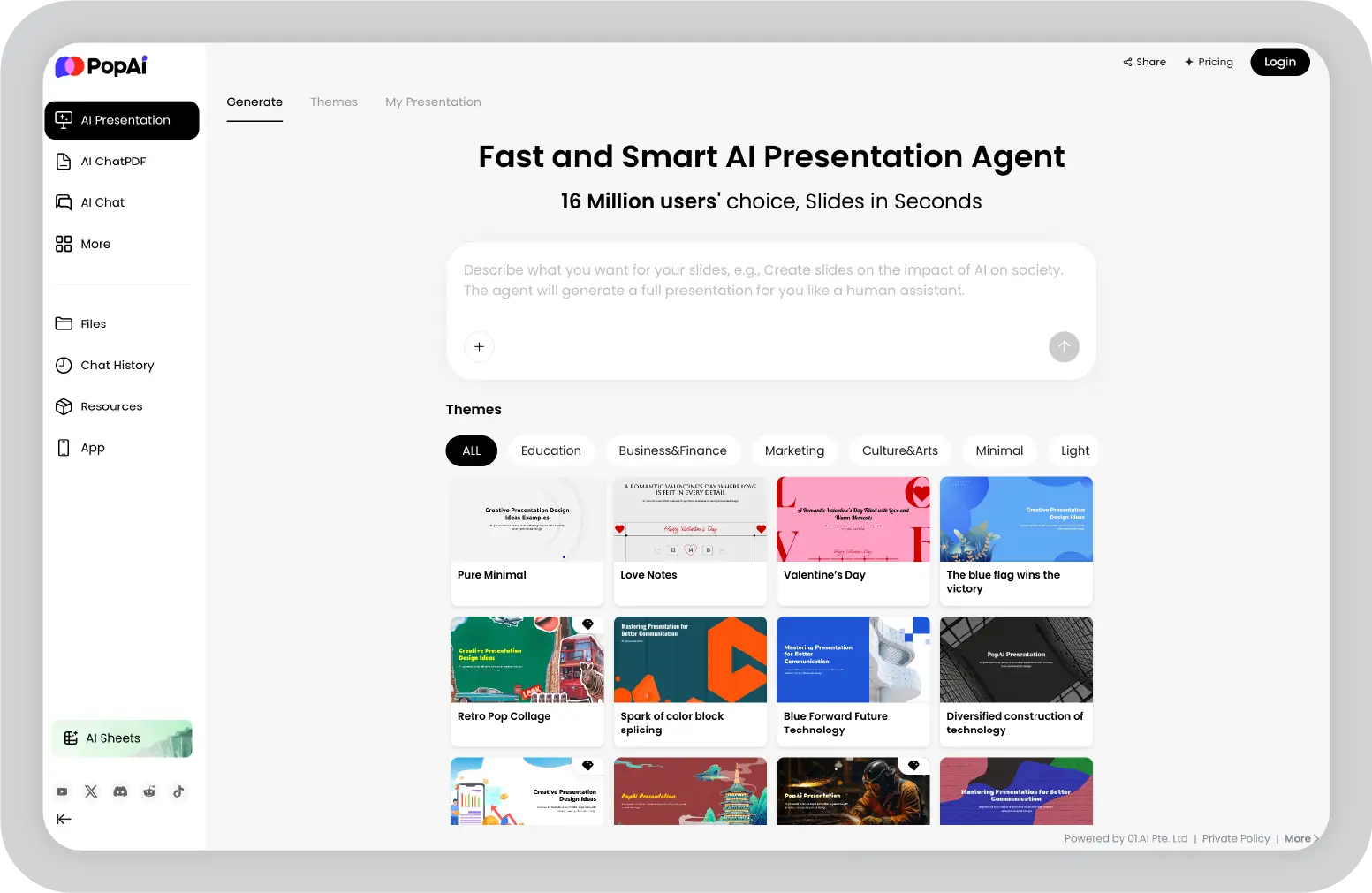
Step 2: input your content or topic
Choose how you want to start:
Step 3: select a template and style
Choose from available templates for business, education, or pitch decks. You can adjust layout, theme, and basic styling. Paid plans offer more options and watermark-free previews.
Step 4: generate and review slides
Click “Generate” to create a full presentation. Most decks include 5 to 20 slides. Review the structure, content flow, and visuals. On higher plans, Boost Mode adds research-backed inputs, since PopAI integrates with search engines for broader context.
Step 5: edit and refine
Reorder slides, update text, and adjust visuals directly in the editor. Built-in suggestions help refine wording, making it easier for marketers and business users to improve clarity without switching tools.
Step 6: export or share
Download the presentation as a PPTX file for use in Microsoft PowerPoint, or share it via a link. The free plan includes watermarks, while paid plans remove them for more polished output.
Pro tip: For team use, export to PowerPoint and review within tools like Google Workspace. PopAI does not support real-time collaboration or structured customer support workflows for teams, which can be a limitation for shared use.
PopAI follows a freemium pricing model, which means you can start with a free version and upgrade as your usage grows. The plans are structured around usage limits, output quality, and access to advanced features like GPT-4 chat, document analysis, and watermark-free exports. For individual users, the pricing is relatively accessible. However, teams should evaluate whether the plan offers enough control and scalability for ongoing workflows.
Here is a clear breakdown of the current PopAI pricing tiers:
Annual billing reduces the effective monthly cost for both paid plans, making them more cost-efficient for long-term use.
PopAI’s presentation maker helps turn prompts, documents, or topics into editable PPTX decks quickly. It works well for fast content creation and early drafts, especially for individual users or startup teams. Here are practical scenarios where it adds value.
Sales teams preparing client pitches
Upload a proposal PDF or add an RFP link, choose a pitch template, and generate a structured deck in minutes. It helps create a solid first draft that can be refined for client use.
Marketers building campaign overviews
Input campaign notes or performance data to generate slides with basic visuals and structure. This helps unify content quickly across presentations without starting from scratch.
Educators creating lesson slides
Enter a topic, select an education template, and generate structured slides. Converting notes into visual formats like mind maps can support more interactive sessions.
Freelancers pitching services
Use a rough outline to create a portfolio or proposal deck. With paid plans, you can export watermark-free presentations, making it useful for quick turnaround work.
Internal teams sharing updates
Upload reports and generate summary slides for status updates. This works for quick internal reviews, though it lacks deeper collaboration features.
Enterprise limitation note
PopAI is effective for individual or small-team use, but it does not support brand governance or structured team workflows. For organizations that need consistent, scalable presentation creation, purpose-built platforms like Prezent AI offer stronger control and alignment.
PopAI simplifies the process of creating presentations by turning raw input into structured slide decks quickly. It is best suited for fast drafts and individual workflows. Here are the key benefits.
PopAI works well for generating quick drafts, but the limitations become more visible when presentations need to meet professional or client-facing standards. As usage increases over time, especially in structured workflows, these gaps can affect consistency, efficiency, and overall output quality.
PopAI fits best in scenarios where presentations are created on demand, with minimal setup and limited dependencies on team workflows. It is useful when the priority is quickly turning ideas, notes, or documents into slides, especially for individual contributors. However, as presentations need to scale across teams or require consistency over time, the gaps in control and standardization become more apparent.
PopAI is a strong fit for individuals who want to create presentations quickly using AI systems for summarization and slide generation.
PopAI is not built for structured, high-volume, or enterprise presentation workflows.
For enterprise teams, choosing the right AI tool for presentations is less about feature breadth and more about how reliably it supports business communication. The priority shifts to brand alignment, security, collaboration, and the ability to produce polished, client-ready decks without repeated manual fixes. While PopAI combines multiple capabilities in one workspace, it is primarily designed for individual productivity rather than structured enterprise use.
The comparison below highlights how PopAI and Prezent differ when evaluated for business presentations at scale.
For business presentations, the limitations become more apparent as expectations increase. PopAI does not support brand governance, which means every slide deck requires manual adjustments to match company standards. Over time, this slows down workflows and introduces inconsistencies across teams.
There are also no built-in team workflows, shared asset libraries, or approval layers. This makes it difficult to standardize creation and editing across departments, especially when multiple stakeholders are involved.
Security is another consideration. Since documents need to be uploaded for processing, teams working with sensitive or proprietary information may find this setup limiting. The lack of SSO and access controls further reduces its suitability for larger organizations that need centralized management.
As usage grows, these gaps shift from minor inconveniences to structural limitations, especially for teams that need to create polished, brand-consistent presentations at scale.
For enterprise teams, the gap is not just about features, but about how consistently a tool supports business communication at scale. Prezent AI is designed to address the structural limitations that appear when moving from individual use to team-based presentation workflows.
1. Brand compliance
PopAI can generate slides quickly, but aligning them to brand standards often requires manual edits. Prezent AI applies brand elements like, colors, fonts, and logos automatically, so every presentation stays consistent without additional cleanup.
2. Industry-trained AI model
Prezent AI’s Astrid is built specifically for presentations. It uses industry-trained models to shape content based on business context, audience expectations, and function. This helps create presentations that feel more relevant and structured, rather than generic.
3. Communication fingerprint
Prezent AI includes a Communication Fingerprint layer that allows teams to adjust tone, structure, and visual style based on the audience while staying within brand guidelines. This makes it easier to personalize presentations across teams without losing consistency.
4. Enterprise security
Prezent AI supports enterprise requirements such as SSO, role-based access control, audit trails, and compliance-aligned security standards. This makes it a better fit for organizations handling sensitive or proprietary information.
5. Team collaboration
PopAI is better suited for individual workflows, where the focus is on quick output rather than coordination across teams. Prezent AI is built for enterprise teams, with collaboration features like shared access, commenting, and the ability to edit decks in PowerPoint or Google Slides for flexible workflows.
Prezent AI is the better choice when presentations are business-critical. If your team needs consistent, high-quality output that aligns with brand and communication standards, a purpose-built platform becomes essential.
If your needs fall outside both PopAI and Prezent, here are other tools often considered by reviewers:
You can explore PopAI alternatives in more detail in this complete guide.
PopAI works best when the goal is speed, convenience, and handling multiple tasks in one place. However, its value depends heavily on how you plan to use it.
If your goal is to move fast and create first drafts instead of spending hours switching between tools, PopAI can be a reliable go-to option for individual use.
But if your team needs to create polished, brand-consistent presentations that reflect your business standards, the requirements are very different. This is where general-purpose tools fall short.
Prezent AI is built specifically for enterprise presentation workflows. It combines brand governance, enterprise security, and an AI layer trained on business communication to help teams create high-quality presentations at scale.
If presentations are a core part of how your team communicates, it is worth evaluating a purpose-built platform.
Schedule a demo with Prezent AI to see how it supports enterprise teams in building consistent, client-ready decks.
PopAI’s Pro plan offers affordable access for individuals, with enough usage for writing and presentations. It can be a good value for freelancers. For enterprise teams, however, the need shifts to brand compliance and collaboration. This is where platforms like Prezent AI provide more value through structured workflows and consistent output.
Pros: All-in-one workspace, fast PDF interaction with OCR, and accessible pricing.
Cons: No brand governance, limited enterprise security, and reported billing concerns. These gaps make it less suitable for teams that need controlled, scalable presentation workflows.
PopAI primarily works as a standalone tool. It supports exports to PowerPoint, but does not offer deep integration with Google Workspace or Microsoft ecosystems. This can limit how teams collaborate across existing tools.
No. PopAI works well for quick drafts and individual use. Enterprise teams typically need presentations that are consistent, audience-aware, and aligned with brand standards. Purpose-built platforms are better suited for those requirements.
PopAI provides a basic tutorial for individual use cases such as document chat and slide creation. It does not offer a structured setup for enterprise workflows like brand governance or team-level controls.
PopAI does not support real-time collaboration or shared workspaces. This can be a limitation for teams that need coordinated input, feedback, and approval workflows across multiple stakeholders.
.webp)
Supriya is a Content Strategist and Creator at Prezent AI with extensive experience in brand storytelling, digital strategy, and B2B content. She has worked across SaaS and technology-driven businesses, building content engines that drive awareness, engagement, and pipeline growth. Passionate about crafting clear, insight-led narratives, Supriya focuses on turning complex ideas into compelling stories that resonate with modern business audiences. You can connect with her on LinkedIn.













