No items found.
No items found.

Google tools already power how most teams build and share presentations. From Slides to Drive, the ecosystem is deeply embedded in everyday workflows. So when Nano Banana introduces AI-driven visual generation within the same environment, it naturally becomes a candidate for presentation creation. However, when teams look beyond visuals and evaluate the best AI presentation maker, they often prioritize tools that support full deck creation, storytelling, and editability.
Teams trying Nano Banana see immediate value. Visuals that once required hours of design effort can now be generated in seconds. Charts, infographics, and structured slide elements come together quickly, making it a compelling option for accelerating early-stage slide creation.
But enterprise presentations are not built one slide at a time. They require cohesive storytelling, consistent branding, and the flexibility to evolve as data and messaging change. As teams move from generating visuals to building full decks, gaps in structure, consistency, and editability begin to surface.
In this guide, I evaluate how Nano Banana fits into enterprise presentation workflows, where it delivers the most value, and how teams can bridge the gap between fast visual generation and fully editable, production-ready presentations.
This quick-scan table evaluates how Nano Banana performs across the key dimensions that matter for enterprise presentation workflows. It highlights where the tool adds value and where teams may need additional capabilities to scale from individual visuals to complete, production-ready presentations.
Nano Banana Pro is Google’s AI image generator powered by Gemini models, designed to convert text prompts into presentation-ready visuals. It is accessible through Google AI Studio, the Gemini app, and directly within Google Slides. While it is not built as a presentation platform, it plays a strong role in creating individual slide visuals.
To use Nano Banana effectively in presentations, the focus should be on structure, not just generation. The tool responds best when treated like a design assistant with clear direction. A well-defined workflow helps teams move faster while maintaining clarity and consistency across slides.
Here is a practical approach I use to turn ideas into presentation-ready visuals.
1. Access the tool within your workflow
Access Nano Banana through Gemini, Google AI Studio, or directly within Google Slides. Enterprise teams can also use Vertex AI for governance and scalability.
Because Nano Banana sits within the Google ecosystem, teams can generate visuals without disrupting existing workflows.
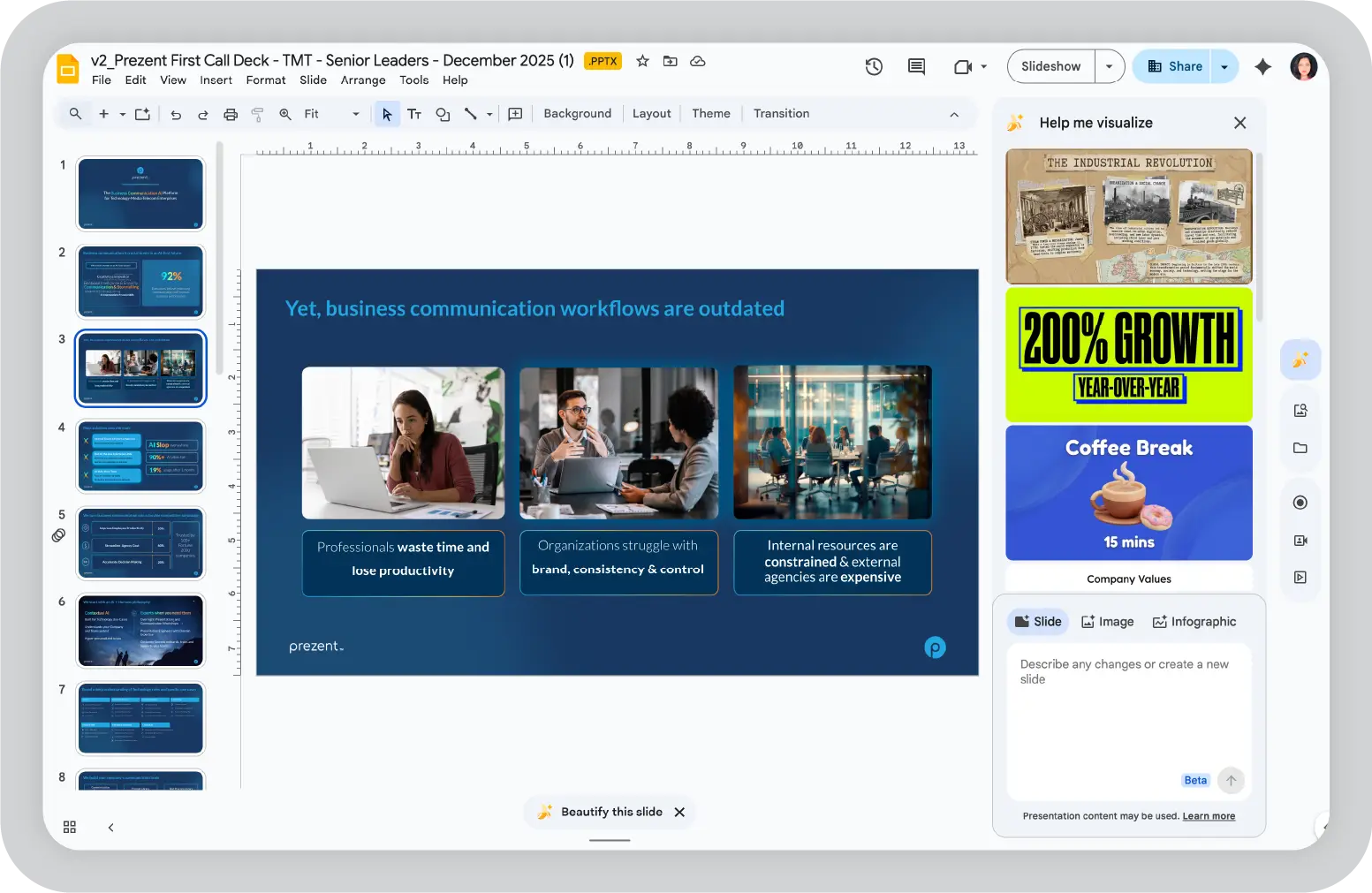
2. Define structured AI prompts for presentation visuals
Define prompts with clarity and intent. Instead of requesting a generic image, describe the visual with the same level of detail you would give a designer.
For example:
“Generate a 16:9 infographic for a Q1 2026 performance review, showing 25% revenue growth bar chart, blue corporate theme, legible white labels, and logo placeholder top right.”
Clear prompts improve both accuracy and usability of the output.
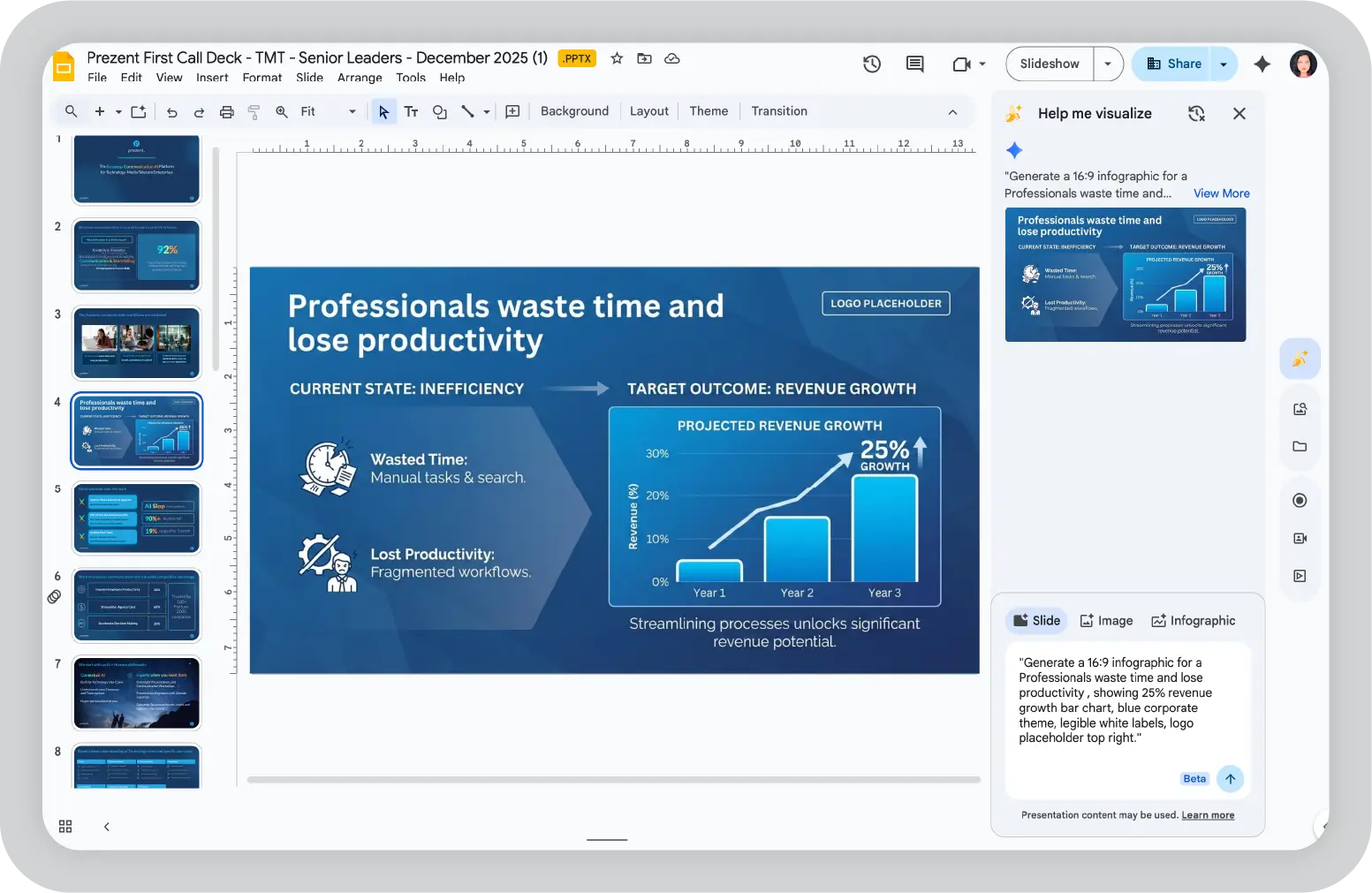
3. Generate and evaluate AI-generated visuals
Once the prompt is submitted, review the generated variations with a focus on clarity, layout, and alignment with the slide objective.
Select the version that communicates the message most effectively. Minor refinements can be addressed in the next step.
4. Maintain consistency across Nano Banana slides
Consistency becomes critical when building multi-slide presentations. To maintain a unified visual style, continue working within the same session and reference earlier outputs.
For example:
“Using the same style and color palette, create an agenda slide with sections: Goals, Metrics, Plan, Next Steps.”
Where available, style references such as brand guidelines or prior visuals can help guide consistency across multiple images.
5. Create accurate business charts
For charts and metrics, prompt clarity directly impacts output quality. Define values, labels, and formatting explicitly.
Example:
“Bar chart: Q1 revenue $2.5M, up 25% YoY, Q2 $3.1M, clean axis labels, consistent theme.”
This ensures the generated visual aligns with the intended message and reduces the need for rework.
6. Refine outputs using AI prompt iteration
Instead of restarting, refine outputs through targeted instructions.
For example:
“Enhance contrast and ensure all text is readable.”
“Keep the layout, adjust icons to a flat vector style.”
Each iteration produces a new version, allowing teams to move toward the desired outcome efficiently.
7. Export and integrate Nano Banana visuals into slides
Once finalized, export the visual as a high-resolution PNG and integrate it into your presentation tool, such as Google Slides, PowerPoint, or Prezent AI.
At this stage, teams can structure the slide, add editable content, and align visuals with the broader narrative and branding requirements.
Nano Banana performs best when prompts are structured with clarity and intent. As an AI image generator, it responds directly to how well the input defines the visual. Vague prompts tend to produce generic outputs, while precise instructions can generate visuals that are ready to use in presentations.
For teams building presentations, prompt quality becomes a critical part of the workflow. It directly impacts how quickly visuals move from generation to actual use in slides.
A consistent structure improves both accuracy and repeatability. Over time, I’ve found that using a simple prompt framework makes Nano Banana outputs far more reliable.
Format:
“16:9 + chart or visual type + exact data + colors + text requirements + layout”
This structure ensures the output aligns with how presentation visuals are typically designed, reducing the need for multiple iterations.
Below are a few examples that show how structured prompts can translate directly into presentation-ready visuals with minimal rework.
Below are a few examples that show how structured prompts can translate directly into presentation-ready visuals with minimal rework.
Executive KPI dashboard
“16:9 dashboard showing Revenue $3.2M, Growth +28%, Customers 1,450. Corporate navy blue palette, white bold sans-serif labels, minimalist flat design, 4 key metrics in grid layout.”
Sales funnel infographic
“16:9 horizontal funnel: 100% leads → 42% qualified → 18% proposals → 9% closed. Blue gradient background, large white percentage labels, progress arrows between stages, clean corporate style.”
Product roadmap timeline
“16:9 horizontal timeline: Q1 Research, Q2 MVP, Q3 Launch, Q4 Enterprise. Circular milestones with icons, blue corporate theme, quarter labels below line, consistent spacing.”
Clear instructions improve both output quality and consistency across slides. The following guidelines help teams understand what to follow and what to avoid when using Nano Banana for presentations.
Nano Banana focuses on generating high-quality visuals, particularly for individual slides. However, as teams move from visual creation to building complete presentations, certain nano banana limitations become more noticeable.
Here are the key constraints to consider.
In practice, this can create a fragmented workflow. Teams generate visuals in Nano Banana and then assemble them in presentation tools. As content evolves, updates often require regenerating visuals instead of making quick edits.
For enterprise teams that need consistency, scalability, and frequent updates, these factors are important to evaluate when incorporating Nano Banana into presentation workflows.
As teams incorporate Nano Banana into their workflows, its role becomes clearer. It is effective for generating high-quality visuals such as charts, infographics, and conceptual slide elements. However, enterprise presentations require additional capabilities such as structured storytelling, consistency across large decks, and the ability to update content quickly.
This is where Prezent AI becomes central.
Prezent AI is not a design add-on. It is an end-to-end business communication platform built for enterprise use cases. Teams can create complete, on-brand presentations tailored to their industry, brand guidelines, and audience using simple prompts, data inputs, reports, or even rough notes.
Platform comparison: Nano Banana vs Prezent AI
Prezent AI goes beyond slide generation. Prezent AI is designed to align presentations with industry context, audience expectations, and enterprise standards.
At the core is Astrid, powered by Specialized Presentation Models (SPMs). These models capture industry language, business context, and proven presentation patterns, enabling teams to create decks that are both relevant and decision-ready.
While tools like Nano Banana support visual creation, enterprise presentations require a broader set of capabilities. Teams need structured storytelling, consistent branding, and the ability to update and scale content across multiple stakeholders.
Prezent AI supports this end-to-end:
This allows teams to move from creating individual visuals to building structured, scalable presentations that align with business goals.
In enterprise presentation environments, workflows need to move beyond individual visual creation to full deck production. When teams rely on image-based outputs, they often spend 4+ hours per deck assembling slides, managing brand consistency, and updating data manually.
Prezent AI addresses this gap with an end-to-end presentation platform built for enterprise use. With governance, scalability, and business context intelligence built in, teams can create complete, editable presentations without repeated rework.
This shift enables up to 8x faster presentation development while maintaining visual quality and consistency.
Schedule a demo today to see how Prezent AI can streamline your presentation workflow.
No. Nano Banana Pro, as an AI image generator, creates static PNG visuals such as charts and infographics. It does not function as a presentation builder. It cannot generate multi-slide decks, define slide sequences, or produce editable presentations.
Teams typically use additional platforms to assemble and manage complete decks.
The key Nano Banana limitations in enterprise workflows include:
These limitations are important when evaluating Nano Banana for enterprise presentations.
Nano Banana is accessible through the Gemini app, Google AI Studio, and within Google Slides using features like “Help me visualize.”
As an AI image model, it generates visuals that can be inserted directly into slides. However, these outputs remain static images, with no native support for editing after insertion.
It depends on the use case:
A common approach is to use Nano Banana for initial visuals and Photoshop for refinement.
Limited success. Style referencing helps, but prompt precision is critical. 10+ slide decks often show color/layout drift. Enterprise teams need Prezent AI's auto-brand themes for zero-drift compliance.
Both versions remain AI image generators and do not support full presentation creation or editing.
.webp)
Supriya is a Content Strategist and Creator at Prezent AI with extensive experience in brand storytelling, digital strategy, and B2B content. She has worked across SaaS and technology-driven businesses, building content engines that drive awareness, engagement, and pipeline growth. Passionate about crafting clear, insight-led narratives, Supriya focuses on turning complex ideas into compelling stories that resonate with modern business audiences. You can connect with her on LinkedIn.