No items found.
No items found.

So, you've got a big presentation coming up, and you want to nail it. But there's one thing standing in your way: memorization. Memorizing your presentation can seem like a daunting task, but fear not!
With the right techniques and presentation creation tools, you can commit your material to memory with ease and deal with the fear of public speaking.
Before looking into the how, let's first understand the why. Rehearse your presentation for several benefits:
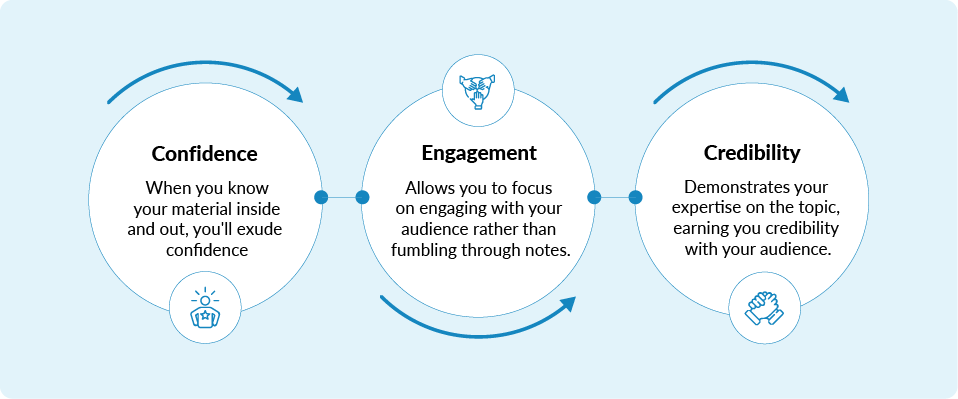
Now that we understand the importance of memorization, let's address some common pitfalls to avoid:
Here are some effective techniques to ensure you deliver the speech or presentation with confidence and poise. Whether you're a seasoned professional or preparing for your first public speaking engagement, these strategies will enhance your preparation process and performance.
Before you even begin to memorize your presentation, it's crucial to have a deep understanding of your material. Break down your content into key concepts and frame it like a story with a good flow. This isn't just about remembering words but grasping the essence of what you're going to talk about. Relate these concepts to stories or experiences for easier recall.
After breaking down the content and relating it to personal experiences, map out a narrative arc for your presentation. What are the key points? How does one idea flow into the next? This will not only help you remember the order of your content, but it will also make your presentation more engaging.
The loci method, or memory palace technique, involves associating parts of your presentation with specific physical locations. By visualizing a familiar place and 'placing' elements of your talk in different locations within this space, you can walk through the area in your mind to help recall information.
Example: For a presentation on the impact of regular exercise, assign each key point to a room in your house using the mind palace technique:
This concise setup creates a mental journey through your presentation, helping you recall each part clearly during delivery.
It is a powerful tool for organizing your thoughts and ideas visually. By creating a mind map of your presentation, you can see the relationships between different sections and points. This visual representation makes it easier to memorize the flow of your presentation and recall details during your delivery.
Not only does a mind map provide a clear picture of your content structure, but it also encourages creativity. Essentially, it's brainstorming amplified. By the end, you are left with a rich tree of thoughts and ideas - your complete presentation, written out in an easy-to-follow map. So, next time you are preparing for a presentation, take a moment. Create a mind map.
The 20-20-20 rule of rehearsal is simple and very effective. Every 20 minutes, take a 20-second break and look at something 20 feet away to prevent eye strain and maintain focus. This technique helps not only to rest your eyes but also to refocus your mind. It's a moment to breathe, to recalibrate, to reassess.
You'll find that when you return to your task, quite often you’ll approach it with a renewed sense of clarity. And guess what? It won't derail your productivity, it will enhance it. So, set your timer, practice the 20-20-20 rule, and see the difference it makes.
There's no substitute for practice. The power to influence, inspire, and inform an audience lies in your ability to confidently present your material. Rehearsing your presentation multiple times is an absolute necessity. Each rehearsal should focus on refining different aspects - from your tone of voice to your body language.
Try practicing in front of a mirror. Watch your facial expressions and movements - do they align with the message you're trying to convey?
Don’t shy away from presenting to a friend or colleague. They can offer valuable feedback that you might overlook. Their perspective can help you pinpoint areas for improvement - from your content clarity to your engagement skills.
Mnemonic devices are shortcuts to help you remember information more easily. Create acronyms, phrases, or even songs that are related to the content of your presentation. These tools are particularly useful for memorizing lists or complex information. Example -
Rather than attempting to engulf the entirety at once, take it bit by bit. Start with the introduction. Then the first key point. Followed by the next. Revisit each segment, solidifying your grasp before proceeding. This piecemeal approach fosters understanding and retention.
Now apply this tactic in a broader context. Imagine the potential improvement in processing complex instructions, studying for a crucial exam, or even mastering a new skill. Chunking is not just for presentations. It's a powerful tool in our cognitive arsenal to improve productivity and efficiency, providing an antidote to the overwhelm of big tasks. Take it step-by-step.
Our bodies and minds are interconnected. Using gestures or physical movements while assembling your presentation could be your game-changer. The theory is simple: associate different elements of your speech with specific movements. This technique is rooted in the idea of muscle memory - your body remembers.
For example, try pointing up when discussing quarterly growth, or stride across the room when talking about overcoming challenges. The physical act of moving can help reinforce your material, making it easier to recall during the presentation.
Use apps and tools designed to improve memorization and practice. From presentation software with storybuilder features to flashcard apps that help you drill main points, technology can be a valuable ally in your preparation. You can even record your presentation to check how it looks.
Teaching someone else about your presentation content is not just a rehearsal; it's a powerful learning technique known as the "Protégé Effect." This strategy is grounded in the principle that teaching information to another person improves the teacher's own understanding and retention of the material. When you explain concepts to someone else, you are forced to clarify your thoughts, identify any gaps in your own knowledge, and think about the material in new and different ways.
The adage "a healthy body houses a healthy mind" is more than just a saying; it's backed by extensive scientific research. The interconnection between physical health and mental acuity cannot be overstated. A good night's sleep, proper nutrition, and regular exercise are foundational elements that support cognitive functions, including memory, attention, and problem-solving skills.
Did you know - A study from the University of British Columbia found that regular aerobic exercise, the kind that gets your heart and your sweat glands pumping, appears to boost the size of the hippocampus, the brain area involved in verbal memory and learning.
Visualizing success, particularly in the context of preparing for a presentation, is a powerful technique rooted in cognitive psychology. This practice involves creating a detailed mental image of achieving a desired outcome, including feeling confident and engaging your audience effectively during a presentation.
The science behind visualization is based on the principle that the brain and nervous system respond similarly to imagined experiences as they do to real experiences. This means that by visualizing success, you can condition your mind and body to perform more effectively in the actual situation.
Reflecting on and adjusting your approach after each practice session is a critical part of mastering any skill, including memorization and presentation delivery. This iterative process is grounded in the principles of deliberate practice and reflective learning, which are key to achieving expertise in any field.
An example of the reflect and adjust method in action can be seen in medical education, where students often engage in simulated patient interactions. After each simulation, students reflect on their performance, receive feedback from instructors, and identify specific areas for improvement. This process has been shown to significantly improve students' diagnostic accuracy and patient communication skills over time.
Even with thorough preparation, forgetting a part of your presentation can happen. If you find yourself drawing a blank mid-speech, take a deep breath, and try one of these strategies to remember your presentation:
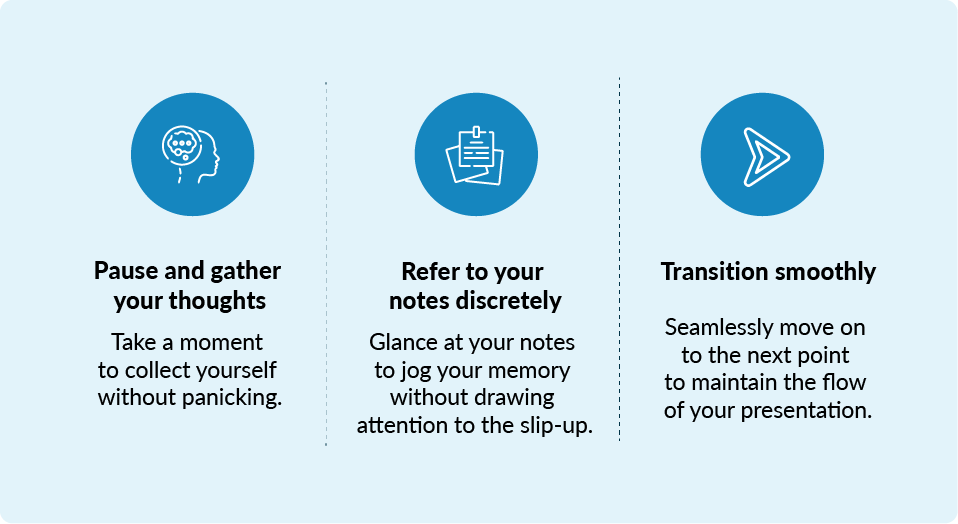
Memorization time varies depending on the length and complexity of the presentation, but consistent practice can significantly reduce the time required.
While cue cards can be helpful for reference, relying too heavily on them can hinder your connection with the audience. Aim to minimize their use through thorough memorization and practice.
While it's essential to have a thorough understanding of your material, aiming for word-for-word memorization can lead to robotic delivery. Focus on memorizing key points and transitions for a more natural presentation.
Mistakes are natural and happen to everyone. Take a deep breath, acknowledge the error gracefully, and continue with your presentation. Your ability to recover smoothly can even enhance your credibility with the audience.
Practice relaxation techniques such as deep breathing, visualization, and positive affirmations to calm pre-presentation nerves and boost your confidence.
Prezent is a comprehensive AI-powered platform designed to enhance the effectiveness and efficiency of your presentations, making it easier for you to memorize and deliver them with confidence.
Generative AI: Converts complex sentences into clear, concise presentations. This feature helps in breaking down intricate ideas into simpler, more memorable pieces.
Executive summary synthesis: Converts detailed decks into a one-page summary, focusing on the essence of the presentation. This aids in grasping and remembering the core message.
Structured storylines: Utilizes AI to help structure presentations in a narrative format, making the information more engaging and easier to remember.
Access to 35,000+ brand-approved slides: Offers a vast library that can be used to create visually appealing and narrative-driven presentations, enhancing the storytelling aspect.
Personalized on-brand presentations in seconds: Quickly generates presentations that align with brand guidelines, saving time and allowing presenters to focus more on the content's delivery and memorization.
Story-builder tool: Streamlines the creation process by providing a structured framework for presentations, reducing the time spent on design and layout.
Redesign to brand-new look: Instantly transforms slides into visually appealing formats that are consistent with brand identity, making the visual aids more memorable.
Library of curated best-practice presentations: Offers access to high-quality visual and content templates that enhance the visual appeal and recallability of presentations.
On-demand learning modules: Provides modules on the art and science of business communication, including effective use of visual aids and storytelling, which can improve presentation skills.
Communication fingerprints: A unique feature that helps understand personal or audience preferences, enabling the creation of more personalized and impactful presentations that are easier to remember.
Remember, creating a presentation that is as visually compelling as the information it contains will elevate your confidence, making your delivery in front of a large audience seamless and powerful.
Explore Prezent with a free trial to create such stunning presentations. Schedule a demo to experience all the product features and how it can elevate your presentations.







.png)





