A strong project presentation is an opportunity to capture the attention and imagination of stakeholders while effectively presenting the project. It’s more than just a summary of facts—it’s a clear picture of your vision, outlining strategy, and getting everyone on the same page right from the start of the project.
In this article, we’ll explore how to create an engaging and effective project presentation, offer a practical example, and even share a handy template to help you get started.
What is a project presentation?
A project presentation is a structured method of communicating key information about a project and how the project aligns with business objectives. It goes beyond the use of slides and visuals; it is about effectively conveying your project’s vision, objectives, progress, and requirements. The goal is to ensure that all participants are informed, engaged, and aligned with the project's direction and needs.
A project presentation can happen at any point in time—whether you're introducing a new idea, providing a project update, reviewing progress, or explaining the project's roadmap. A successful presentation keeps your audience engaged and ensures that your message is clear and impactful.
The importance of effective project presentation
A project presentation is a critical tool for project managers, playing an essential role in ensuring a project’s success. It serves as a platform for project management, aligning team members, securing buy-in, and clearly communicating the project’s objectives, scope, timeline, and resources required. This helps when you present a project the next time.
Clarity in communication: A project presentation is essential for clearly communicating the project's goals, scope, and timeline. In an enterprise setting, where multiple departments may be involved, it’s critical to ensure that everyone—from executives to front-line staff—understands the objectives. Whether it's a budget or a scope section of the presentation, clarity is crucial. For example, if a healthcare organization is introducing an electronic health record (EHR) system, the presentation would clarify the system's goals, timeline, and responsibilities, reducing the risk of miscommunication.
Alignment of team: Effective presentations align the project team and stakeholders with the overall vision and objectives. When there is shared understanding, team members are more motivated, and stakeholders are more likely to offer their support.
Securing support and resources: Project presentations are important for approvals and securing the necessary resources to move forward—whether it’s a budget, additional team requirements, or tools. By presenting the project's value and potential outcomes, managers can make a compelling case for why it’s worth pursuing, aligning the project with organizational priorities. Example: A manufacturing company planning to upgrade its machinery would use a project presentation to show the financial benefits of the new equipment, the expected increase in efficiency, and the return on investment (ROI). This clarity helps decision-makers understand the value of the project and, ultimately, approve the necessary budget and resources.
Collaboration and feedback: Every project presentation provides open dialogue, allowing people to discuss the project, ask questions, offer suggestions, and voice concerns. This feedback loop ensures that everyone has an opportunity to contribute and that potential issues in the project charter are addressed early. Collaboration during the presentation phase leads to a more refined and well-rounded project plan, improving the likelihood of success.
Ensuring long-term project success: By setting clear expectations and demonstrating a structured approach, a project presentation establishes the groundwork for smooth execution. It ensures that everyone remains focused and engaged throughout the project lifecycle. With everyone aligned from the beginning, the project is better positioned to achieve its goals and deliver successful outcomes.
How to structure the project presentation
91% of presenters feel more confident delivering presentations with a well-designed slide deck. Make a professional-looking presentation that establishes the presenter’s confidence and ensures better audience engagement. You want to guide your audience through your project’s story logically and engagingly. Here's a presentation design that works well for presenting your project and what to include in each slide:
Project overview: Begin with a concise executive summary of the project, highlighting its core objectives and expected outcomes to explain your project effectively. Provide a brief introduction to the project, its purpose, and the motivation behind its initiation. This will help the audience understand the significance of the project right from the start. Articulate the long-term vision of the project and its intended impact. What transformation is expected, and how does it align with the broader goals of the organization or industry?
Project scope: Outline the overall strategic approach for the project, ensuring that the presentation structure is clear and concise. What are the key goals and tactics that will be employed to achieve success? Provide a brief analysis of the current situation, market conditions, or competitors that are influencing the project. This contextualizes the project and its strategic importance within the broader industry landscape.
Project roadmap: This slide highlights the project status and recent developments. An update on the project's current progress is crucial to maintaining transparency and demonstrating ongoing efforts. Sharing accomplishments, completed tasks, and any positive developments will provide reassurance that the project is on track and moving forward as planned. It is important to outline the project's next steps and expectations. This section clarifies the processes and actions to be taken in the coming phases, providing a project roadmap for future efforts while ensuring alignment across all teams.
Risk assessment: When delivering project presentations, it is crucial to highlight potential risks and challenges that could impact the project. These may include resource constraints, technological hurdles, or external market factors. A thoughtful discussion on how these risks will be mitigated demonstrates preparedness and reassures that the project will be managed effectively.
Staff, resource, and project activity plan: These are the crucial components of the framework for the project lifecycle. In this slide, discuss the personnel involved in the project and their specific expertise that contributes to the project’s success. Identify the critical resources required for the project, including funding, technology, and equipment. Provide a detailed activity plan or Gantt chart that outlines the key actions, project timelines, and tasks assigned to individuals and teams.
Success measures and levers: In this slide, it is essential to define the key success measures for creating a successful project presentation. These might include specific performance metrics, start and end dates, and quality standards. Clear success measures ensure that all are aligned on how the project’s success will be evaluated. Identifying the key levers or actions that will drive transformation is critical. These are the strategic initiatives that will help propel the project forward and overcome potential obstacles. Understanding these levers helps ensure that the project remains focused on achieving its desired outcomes.
Feedback and Q&A: Lastly, inviting feedback and questions from the audience fosters an open and collaborative environment. It is a vital part of the keynote presentation to ensure all concerns are addressed. Encouraging suggestions and discussions not only strengthens the project’s direction but also demonstrates a willingness to incorporate valuable input from key stakeholders.
A compelling project presentation example:
Here is an exciting example of how to make your presentation.
Suppose a manager for a new software development project is asked to prepare a presentation and help the team understand the project's goal and how to achieve it.
Start by introducing the project: "Today, I’ll walk you through our plan to develop an innovative new app that will streamline internal communication across the company."
Quick overview of the objectives: "Our goal is to launch a beta version within 6 months, with a focus on increasing team collaboration by 30% through effective project action plans."
Dive into the roadmap: Showing a timeline with key phases such as market research, development sprints, testing, and launch.
Share a few risks that may impact the project outcomes: "We anticipate some potential delays in integration with existing systems, but we have a backup plan to address any challenges."
Introduce your team: "Here’s our amazing team, from our lead developers to the marketing experts who will help us spread the word about our project type."
Finally, you wrap up with the following steps: "Our next milestone is to complete user testing, and we’ll be checking in with all stakeholders in two weeks to review progress.”
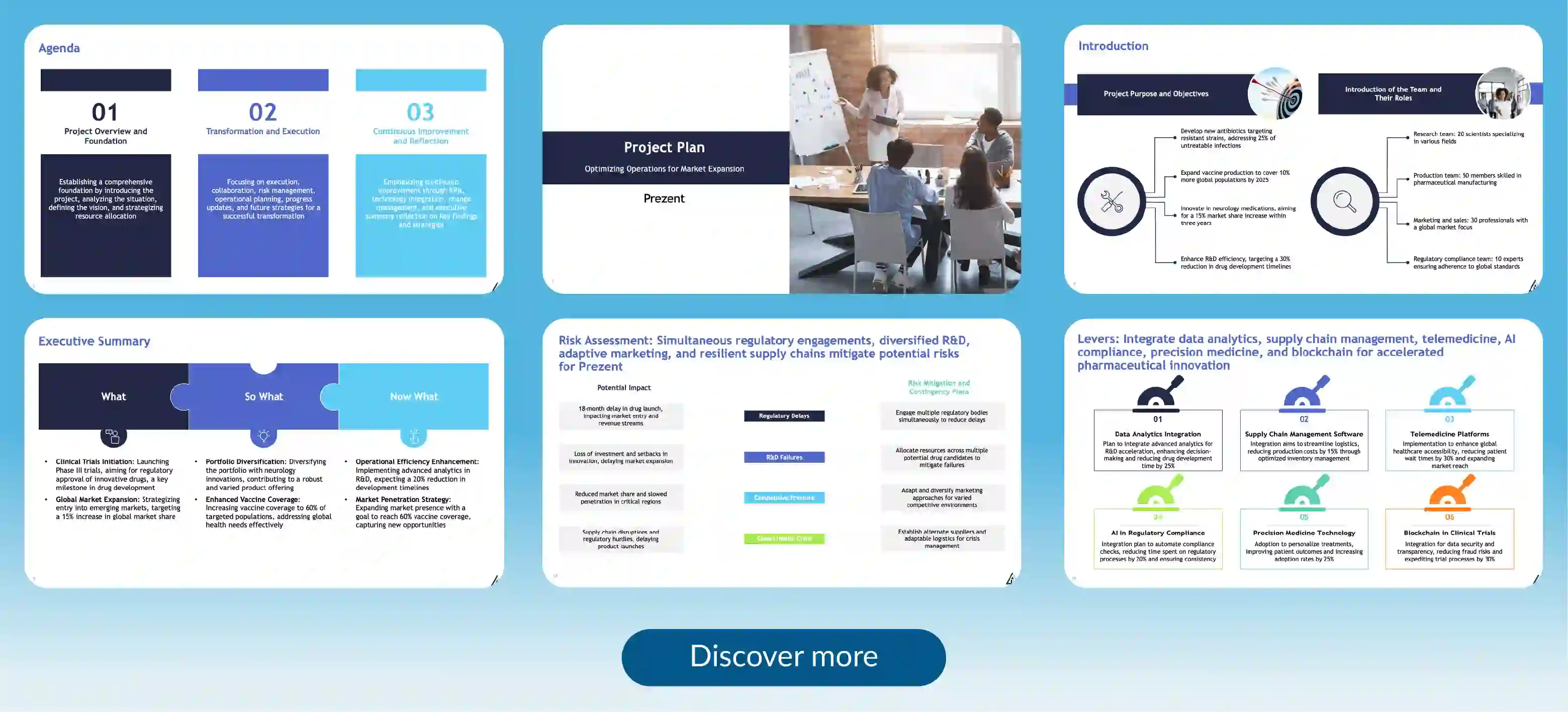
Professionally designed presentation template for your next project plan
Creating project presentations is critical for any organization to deliver projects on time, within budget successfully, and according to scope; a project presentation is a business activity that helps achieve this. Whether you're presenting to your project team, stakeholders, or executive leadership, having a clear and well-structured presentation is essential. This template can be used in PowerPoint presentations as well.
This template offers a comprehensive framework to outline key elements such as project scope, deliverables, work breakdown structure (WBS), timeline, budget, and risk management strategies. With professionally designed slides, focus can be directed towards defining project goals, outlining project phases, assigning responsibilities, and highlighting critical dependencies. Whether initiating new projects, managing complex initiatives, or tracking project progress, this template empowers with clarity and facilitates informed decision-making to drive project success and achieve desired outcomes. Make a project presentation that aligns with your goals and showcase your amazing presentation skills.
Create a project presentation with Prezent
Prezent is a communication success platform designed for enterprise teams. It is an AI-powered platform that enables professionals to create expert-quality presentations in 90% less time. Its AI presentation software ensures brand consistency while saving you valuable time.
Here's why Prezent is the ideal design tool for crafting compelling project presentations that highlight project activities:
Brand-aligned presentations: Prezent ensures that your project information is well-organized for a compelling presentation. It also ensures project presentations stay consistent with your company’s brand guidelines. With tools for full brand customization, you can maintain brand colors, logos, fonts, and visual style across all slides, ensuring a cohesive look and feel.
Collaboration made easy: Share your project presentations with team members for seamless collaboration, and team members can effectively discuss the project and share insights. With Prezent, you can quickly review and refine your presentation in real time, ensuring everyone is aligned.
Ready-to-use templates: Prezent offers a variety of customizable templates for creating an engaging presentation. So, whether you’re a project manager, marketer, or executive, you can quickly create professional presentation slides that suit your needs.
Stakeholder-ready presentations: Prezent helps you turn your project data into compelling presentations that are perfect for clients or leadership teams with the help of AI. Ensuring project goals, timelines, and milestones are communicated clearly and effectively.
Prezent is the perfect tool for organizing and visualizing your project plans. Its dynamic features make your message stand out, and it takes your project presentations to the next level, ensuring a successful presentation. Start a free trial today to explore our presentation software or connect with our experts for a demo on how to create presentations that drive success. Build your next presentation with Prezent.
What is an AI presentation maker? Capabilities, limitations & use cases
Cut deck time by 80% with AI presentation makers. This enterprise guide covers must-have features, proven ROI, and a PowerPoint comparison, plus real-world use cases for proposals, QBRs, and RFPs.
Best Canva alternatives: AI presentation tools from free to enterprise
Looking for a Canva alternative for presentations? Compare AI tools, free and paid plans, workflows, and features across small business and enterprise platforms.
7 Best Google Slides alternatives: Best presentation software for business teams
Google Slides alternatives ranked for business. Compare AI presentation tools, enterprise features, pricing, and collaboration options to find the right fit for your team.
14 Best Visme alternatives: Free, AI-powered, and enterprise presentation tools compared
14 Best Visme alternatives: Compare 14 AI presentation platforms like Prezent, Canva, and Piktochart by pricing, templates, storytelling, and content creation features.
Best Slideshow Presentation Software in 2026: Tested & Reviewed
Find the best slideshow presentation software for 2026. We tested top presentation apps including PowerPoint, Google Slides, and Prezent AI to create slideshows.
14 Best AI presentation makers: Comparing pricing, advantages, and real use cases
Compare the best AI presentation makers, including Prezent, Gamma, Canva, and Beautiful.ai. Review pricing, advantages, limitations, and PowerPoint export performance to choose the right tool.
NotebookLM review: Enterprise guide to Google NotebookLM AI features
NotebookLM review: I reveal the best Google NotebookLM features for business. Turn messy docs into battlecards & presentations with safe, citation-backed AI.







.png)








