No items found.
No items found.

Do you know which category of communication the words you're reading right now fall under? Besides giving it the name of being an article or blog, it is a form of written communication.
From drafting emails to engaging on social media, conveying thoughts and ideas clearly in writing is part of everyday work life. In any business organization, especially where remote and hybrid work is the norm, mastering written communication is important for enhanced organizational effectiveness. Explore this article about the types of written communication, their importance, and tips to improve your writing skills at work.
Written communication is about transmitting messages, ideas, or information through written words. Whether it's an email, a report, a social media post, or even a simple memo, written communication helps convey meaning clearly and directly. It offers the benefit of a permanent record of information, allowing messages to be archived for future reference. At the same time, it also requires good detailing to avoid any misinterpretations.
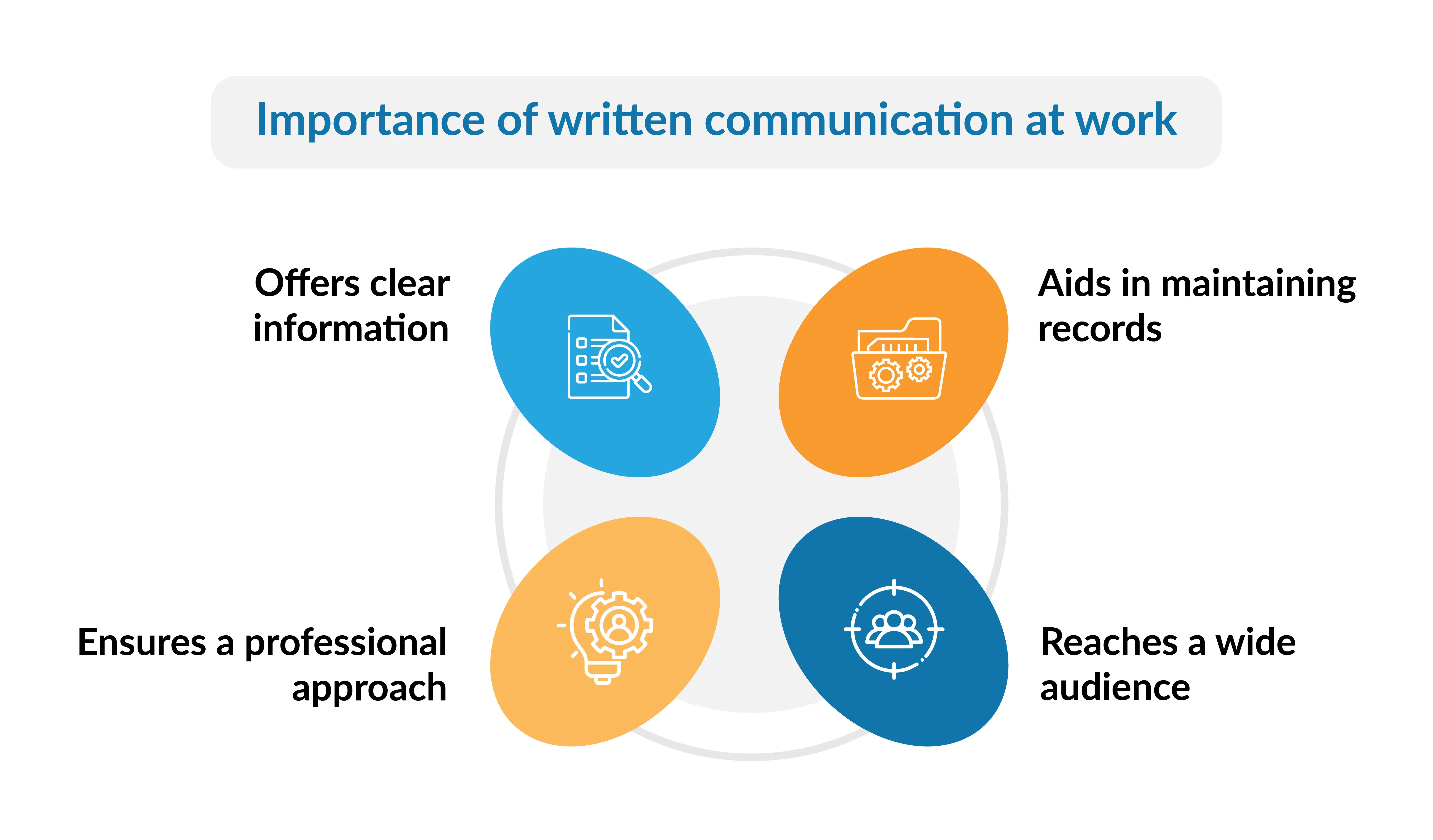
Written communication is essential in the workplace. Here are some of the points highlighting the importance of written communication:
In the workplace, written communication can be divided into two main types: formal and informal. Understanding the distinction between the two can help you navigate professional interactions more effectively.
Formal written communication is a structured and professional way of writing used in work or business. It follows specific rules, like using a professional tone, organizing information clearly, and using correct grammar. Examples of written communication are business emails, reports, memos, contracts, et al., where it's important to be accurate, clear, and professional. Its key attributes include:
1. Structure and format: Formal communication follows a clear structure with defined sections.
For example,
2. Professional tone: In a workplace, it is important to use respectful and professional language. Avoid slang or casual language, especially when addressing a team or leaders.
For example,
❌Instead of saying: "Hey, just wanted to let you know that we're having a meeting tomorrow."
✅Use: "Dear team, please be informed that we have a meeting tomorrow."
3. Purpose and clarity: Whether it’s a policy document, a report, or a proposal, formal communication should be focused and to the point. Vague language can lead to confusion, especially in legal or policy documents. For instance, a policy document will be detailed and precise without confusion, whereas a team-building intimation email will be a little less detailed and could use a fun tone of writing.
4. Record-keeping: Formal communication, such as emails or reports, often serves as a record for business decisions or legal agreements. For instance, emails summarizing meetings or business proposals provide a paper trail/e-trail for future reference.
Examples of formal written communication are business reports (detailed documents such as annual reports, financial statements, or research findings), official emails, proposals, and contracts (which require higher precision and clarity), instructional content (manuals, guides, or how-to articles, etc.), presentations, etc.
Informal written communication is relaxed and conversational. Compared to formal writing, there aren’t any specific rules or regulations to follow. This type of communication can vary in tone or format and is often used to facilitate a quick exchange of information.
1. Casual tone: Informal communication often uses a conversational tone, including colloquialisms, abbreviations, and casual language.
Example: An informal email could begin with "Hi team" and use a friendly, conversational style throughout.
2. Flexible structure: There are no strict formatting or structuring rules. The format can vary depending on the context and relationship between the sender and the recipient.
Example: A quick note or message on a team chat might be a simple line with no formal greeting or closing.
3. Purpose and context: Informal communication is typically used for quick updates, casual exchanges, or personal interactions. It is more about facilitating immediate interaction and less about documenting messages.
Example: An internal chat message asking a colleague if they want to grab lunch is informal and doesn't require a structured format.
4. Less emphasis on record-keeping: Informal communication is only documented or archived if there are any specific business decisions or sensitive information.
Examples of informal written communication include internal chat messages, social media posts, personal notes (quick updates or reminders), etc.
The key to successful professional communication is knowing when to switch between formal and informal tones.
Each type of communication has its place, and finding the right balance ensures you remain professional while fostering team collaboration. The key is to balance them effectively by keeping the following in mind:
💡Pro tip: Maintain professionalism even in informal exchanges. You never know when a casual email might get forwarded to a larger audience!
Written communication provides a clear, permanent record of information that can be easily shared and referenced. It is essential for daily interactions at work and in our personal lives.
While written communication offers many advantages, like precision and the ability to explain complex ideas in detail, it also comes with challenges. The lack of immediate feedback and the risk of misinterpretation can lead to inefficiency. Here are some of the advantages and disadvantages of written communication:
Clear and effective communication skills in the workplace can make things run smoother and save time. Strong written communication skills enhance the organizational processes of a company and help with smooth functioning. Here are some tips to help you get better at business writing:
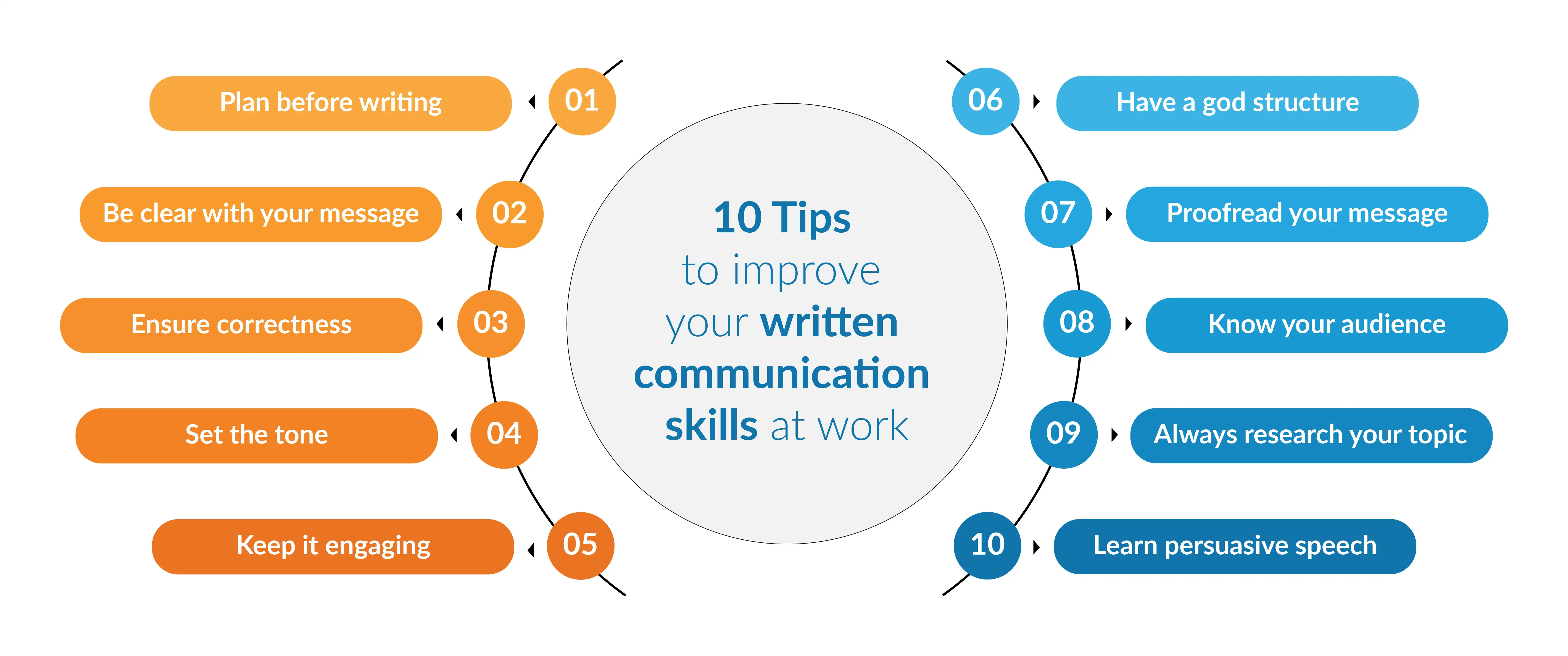
Your message must be easy to understand. Avoid fancy words or complicated sentences that may confuse your reader. Organize your thoughts before you start writing. This ensures that your message is structured and logical.
💡Pro tip: Re-read any written communication as if you were the recipient before sending it. Would it make sense at first glance?
Time is precious, especially in professional environments. Get to the point without unnecessary jargon or overly long sentences. Use active voice and use a formal tone.
For example:
❌Instead of saying: “Please complete this soon, as we would need to send it to the leadership team by the end of this week.”
✅Use: “Please complete this by Friday, 5 p.m.”
Accuracy in spelling, grammar, and facts is non-negotiable. A small error can change the entire meaning of your message, potentially leading to misunderstandings or even damaging your credibility. Use tools like Grammarly or online spell checkers to catch any mistakes.
For instance, a misplaced comma or incorrect figure in a report could alter the entire context, leading to confusion or misinterpretation.
Example:
❌Incorrect: "Let's discuss the project, stakeholders, and timelines during the meeting."
This could imply that there will be stakeholders in the meeting.
✅Correct: "Let's discuss the project stakeholders and timelines during the meeting."
This clarifies that you're discussing the project stakeholders and timelines, not suggesting that stakeholders will attend the meeting.
Tone sets the mood for your communication. Depending on your audience, consider how formal or informal you can be with your words.
💡Pro tip: Maintain a professional tone when communicating with clients. When messaging a colleague, you may opt for a more casual tone.
Make your message engaging by considering your audience’s interests. Use language that resonates with your readers to keep their attention. Clear, straightforward language is always more effective. If you’re unsure about a word, consider if there’s a simpler synonym that everyone will understand.
For example:
❌Instead of writing: "Since our sales have increased by a significant margin over the past few months."
✅Use: "Our sales have increased significantly in recent months."
Good structure makes written content easier to follow. Use headings, crisp bullet points, and short paragraphs to guide the reader through the text.
💡Pro tip: Start with a strong opening that addresses the reader’s pain points, benefits, and clear call to action.
Shorter paragraphs and sentences are easier to read. If your message is lengthy, use bullet points or headings to organize the information, and always revise your drafts for clarity. Simple errors can undermine your message and your image in a professional setup.
Consider your audience’s perspective. Will they find your message valuable? Will it address their concerns?
For instance, if you send an email to recruits about the details of a new project, break it down into a simple format with an explanation of the new terms. This would be easy for the new employees to understand. On the other hand, a team lead can receive an update on the project's progress via short-crip email.
Strong research skills are essential to support your claims with facts when writing formal reports or proposals.
Especially in business contexts, knowing how to craft compelling arguments through writing can influence decisions. Good writing skills can translate to good persuasive speeches.
For example:
❌Instead of saying: “Hybrid meeting schedule will improve team productivity by cutting down unnecessary meetings."
✅Use: “Shifting to a hybrid meeting schedule will increase team productivity by reducing unnecessary meetings, thereby freeing up 4 hours per week for project work.”
💡Pro tip: Use clear, measurable benefits like percentages or time savings to make your argument more compelling. Back it up with data or a case study for added impact.
Different platforms require different writing styles. Adapt your tone and structure to suit the medium, whether it's a formal email, a social media post, or a report.
Focus on clarity and conciseness to ensure effective written communication in an organization. Use clear subject lines, break long texts into bullet points, and always proofread before sending any message in writing. Regularly communicate with your team to confirm understanding and keep communication flowing.
To deal with missing non-verbal cues, it is important to be explicit with your tone. You could convey your tone using positive language, emojis (when and if appropriate), and clear punctuation. If the message is sensitive, it is better to clarify intentions beforehand to avoid misunderstandings.
Affordable tools such as Grammarly, Google Docs, and Slack are ideal for improving written communication. These tools provide real-time editing and collaboration features and enable clear, structured communication at little to no cost.
Avoid jargon or fancy words to prevent misinterpretation. Keep your message simple and break down complex information. To avoid any other miscommunication, always seek feedback to ensure clarity and summarize key points at the end of your meetings or presentations to the team.
Long-complicated messaging, lack of structure, overuse of jargon, and needing to know your audience or context are common barriers to effective written communication at work. Misuse of tone and ambiguity can also lead to confusion in written communication.
A well-chosen writing tone can engage your reader, while a mismatched tone can create misunderstandings. The tone of your written message can affect how it is perceived by the intended recipients.
Presentations are valuable tools and one of the most used formats of written communication in the workplace. They provide structure, clarity, and visual appeal to convey ideas effectively. They simplify complex information and bridge communication gaps for remote or hybrid teams. They help people share ideas, plans, news, and project updates clearly and professionally, especially when team members are not in the same place.
With Prezent, you and your team can ensure everyone understands the message, even in a remote or hybrid work setting. Find out how presentations are important for written communication and how Prezent can help you improve your business communication:
Communication in the workplace encompasses the ability to convey your message effectively. With time and the proper guidance, you can learn to communicate effectively in formal and informal settings. Prezent assists you in refining your communication skills by providing multiple online learning options, like Zenith Learning Workshops and Courses.
Written communication contributes to better organizational efficiency and reduces the time spent on clarifications. At Prezent, we aim to help businesses enhance their communication standards and efficiency by streamlining the presentation creation process. We also provide guidance and train professionals to help them refine their communication skills in the modern workplace.
To learn more about the capabilities and tools of Prezent, you can schedule a demo at your convenience. You can also explore the platform yourself by opting for a free trial.
.webp)
Supriya is a Content Strategist and Creator at Prezent AI with extensive experience in brand storytelling, digital strategy, and B2B content. She has worked across SaaS and technology-driven businesses, building content engines that drive awareness, engagement, and pipeline growth. Passionate about crafting clear, insight-led narratives, Supriya focuses on turning complex ideas into compelling stories that resonate with modern business audiences. You can connect with her on LinkedIn.













