No items found.
No items found.
Prezi and Prezent are often compared because they represent two very different approaches to presentations. Prezi is known for its dynamic, zoomable canvas and non-linear storytelling style. Prezent, on the other hand, is built specifically for enterprise teams that need speed, consistency, and governance at scale.
As organizations grow, presentation needs shift. Enterprise teams are no longer creating one-off decks—they are producing hundreds of presentations across sales, leadership, marketing, and operations. In these environments, manual customization, inconsistent branding, and lack of workflow support can slow teams down.
This is why many enterprises evaluate Prezi vs Prezent, or look for a Prezi alternative that better supports business communication. Prezent positions itself as a modern, enterprise-focused platform that combines structured workflows, built-in brand governance, and context-aware AI to help teams work faster and stay aligned.
In this article, I compare Prezi vs Prezent across key enterprise criteria so you can decide which tool best fits your organization.
When I compare presentation tools, I use criteria that matter in real enterprise environments:
I tested Prezi and Prezent across internal use, leadership decks, sales presentations, and cross-functional use cases. I also reviewed feedback from actual enterprise users.
This table summarizes how the two tools compare in areas that matter most for enterprise teams.
Prezi and Prezent are designed with different philosophies in mind. Prezi emphasizes creative freedom and visual storytelling through motion and non-linear navigation. Prezent focuses on enterprise productivity, helping teams create structured, business-ready presentations quickly and consistently.
Understanding this core difference is essential when evaluating Prezi vs Prezent for enterprise use.
Overall G2 rating
Ease of use
Prezi has a learning curve because the zoomable canvas is different. When I first used it, I had to rethink how I map the story. It works well for creative sessions. But for repeated business use, the structure can slow people down.
Prezent feels intuitive from the start. Its guided setup helps you choose business workflows, templates, and brand elements quickly.
Value for money
Prezi sits in mid range pricing. It works well for individuals and small teams who want expressive presentations.
Prezent is priced for enterprise value. I found that many teams recoup the investment because they save time and reduce design outsourcing.
AI architecture and support
Prezi’s Designer Bot provides slide suggestions based on text input. In my tests, the results helped with early structure, but still needed manual editing for business context and brand consistency.
Prezent’s intelligence is more than slide suggestions. It adapts content to business context and audience needs. This was clear when I tested boards and executive meeting decks.
Brand management
Prezi leaves brand enforcement largely up to users. You set colors and fonts, but teams can override them.
Prezent enforces brand standards automatically. Logos, colors, fonts, and layout rules are built in. This saves many hours of manual checking and fixes.
Global consistency
Prezi can vary because each user controls their slides. Teams must audit manually to keep decks aligned.
Prezent ensures consistent output across all teams. This is one reason it ranks higher in enterprise reviews.
Audience personalization
Prezi requires manual work. You adjust tone and slides yourself for different groups.
Prezent uses audience patterns to tune tone and structure automatically. In my tests, this cut revision time significantly.
The biggest difference between Prezi and Prezent’s AI lies in purpose. Prezi’s AI is designed to enhance visual creativity and layout suggestions. Prezent’s AI is designed to reduce enterprise presentation effort end to end—handling structure, brand compliance, industry context, and audience adaptation automatically.
Prezi’s Designer Bot brings basic AI assistance. It suggests slide layouts based on text prompts. This is great when you want creative layouts quickly. It also keeps you close to the zoomable style Prezi is known for.
However, in enterprise use, Prezi’s AI shows limitations. It focuses on visual design, not on business structure or audience context. It does not adapt for industry language, executive expectations, or brand rules. Teams still need to organize content, refine tone, and enforce brand compliance manually.
Enterprise users often report that while Prezi sparks creativity, it does not reduce the manual work for frequent business presentations.
Enterprise teams see Prezent as a structured solution for business presentations. It is not just a creative tool. Every step is tuned to enterprise needs.
Prezent uses its astrid AI engine to turn raw notes, data, or outlines into complete branded presentations in minutes. When I tested it, I saw how industry language, formatting rules, and business structures are applied automatically. This was especially valuable in complex decks with data and narratives.
Prezent keeps logos, fonts, layouts, and visual language consistent. This removes the manual cleanup that teams often do after exporting from other tools.
You can also use the Template Converter to update older decks to your current brand rules without rebuilding from scratch.
With Communication Fingerprints, Prezent adjusts structure and tone to fit audiences. This helped me tailor decks for executives, clients, and technical audiences without rewriting slides manually.
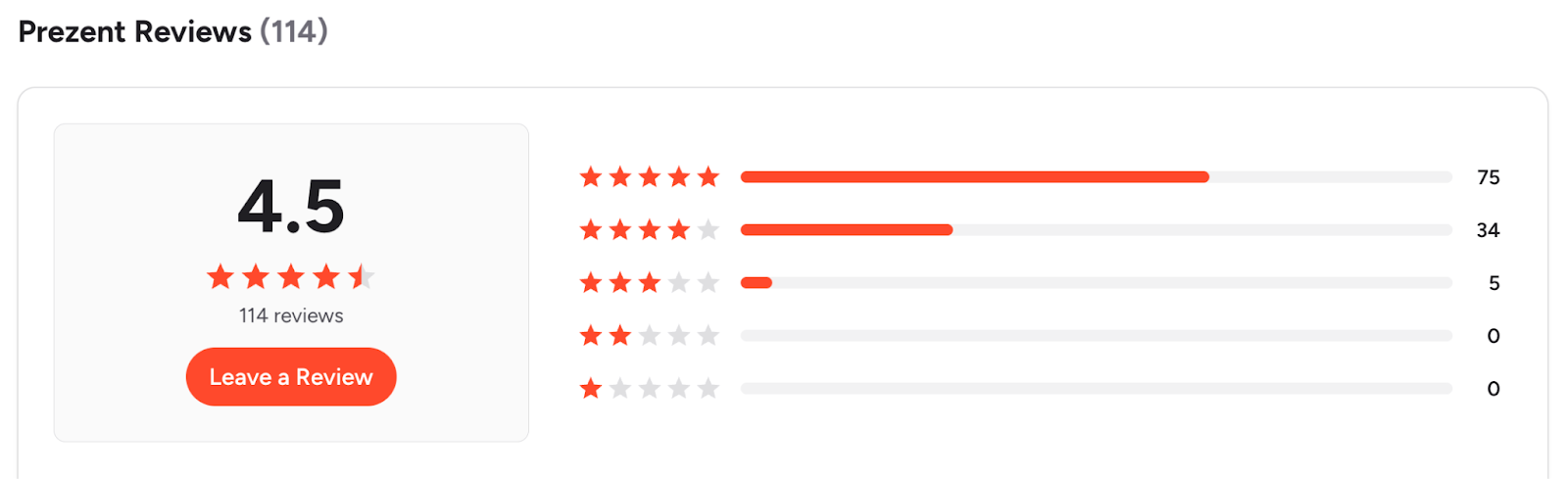
These are direct user sentiments from real review platforms, illustrating why teams prefer Prezent:
Choose Prezi if you need:
Choose Prezent if you need:
Prezi sits in a mid-range pricing tier and often appeals to individual users and small teams. It includes basic design and sharing capabilities, and scales up with team plans.
Prezent uses enterprise pricing, focused on value rather than seat cost alone. It is priced for organizations that need governance, automated workflows, and brand compliance. For this reason, many teams recover the cost through time saved and reduced manual work.
Pros
Cons
Pros
Cons
Prezi focuses on non-linear, visual storytelling, while Prezent is built for enterprise communication with structured workflows, automated brand compliance, and context-aware AI.
For most enterprise use cases—such as sales decks, leadership updates, and cross-functional presentations—Prezent is better suited due to its speed, consistency, and governance features. Prezi is better suited for creative storytelling and smaller-scale use.
For most enterprise use cases, yes. Prezi may still be useful for creative storytelling, but Prezent covers daily business needs more effectively.
Yes. Prezent can import existing presentations and update them to current brand standards using its template conversion capabilities.
Yes. Prezent supports global brand consistency, role-based access, and structured collaboration across regions.
No. Prezent handles layout, structure, and formatting so teams can focus on the message.
Choosing between Prezi and Prezent comes down to what your organization values most. Prezi continues to excel at creative, motion-based storytelling and works well for visual narratives and smaller audiences.
However, when evaluated through an enterprise lens, Prezent stands out. In this Prezi vs Prezent comparison, Prezent consistently delivers advantages in speed, brand compliance, AI-driven creation, and scalability across teams.
From my experience evaluating both tools, Prezent is better suited for organizations that produce presentations frequently and need consistent, professional output without manual rework. It replaces slide-by-slide formatting with automation, enforces brand standards by default, and adapts content for different audiences and business contexts.
If your organization wants to spend less time fixing slides and more time refining the message, Prezent is worth considering. Schedule a demo to see how Prezent compares to Prezi in real enterprise workflows.
.jpg)
Anoob is the Head of Content at Prezent with over 16 years of experience in marketing and content. He has worked with leading startups such as SocialPilot, Writesonic, BigBasket, FreshMenu, GupShup, and SimplyHired. Passionate about social media and digital tools, Anoob enjoys testing new platforms to help businesses make better marketing decisions. You can connect with him on LinkedIn.



.png)