Storyboards are powerful visual tools that play a pivotal role in bringing creative ideas to life. They allow you to plan and visualize projects scene by scene, making them essential for storytelling, filmmaking, advertising campaigns, and business presentations. A storyboard is a visual representation of your project, mapping out each frame with sketches, captions, and annotations. Whether you’re creating a short film, a marketing video, or a website design, storyboards help streamline your workflow, improve communication, and ensure a clear understanding of the project among team members.
In this article, we’ll explore how to create a storyboard using eight unique storyboard examples tailored to different purposes. Additionally, we’ll discuss why using storyboard templates and storyboarding software can enhance your creative process, making it easier to collaborate and review your work with your production team and stakeholders.
What is a storyboard?
A storyboard is a visual tool used to organize and plan the sequence of events in a project, such as a video, website, or advertisement. It consists of frames or panels that represent each shot or scene, accompanied by captions or descriptions of actions, camera angles, dialogue, and sound. Storyboards make it easier to visualize your ideas and ensure that the final product flows smoothly. Whether you’re planning a film, a business presentation, or a video game, storyboards provide a visual roadmap that simplifies pre-production.
Why are storyboards important?
Storyboards are essential because they:
Preview your project: Storyboards allow you to visualize your ideas before production starts, identifying potential issues early.
Facilitate communication: By using visual representations, storyboards make it easier to communicate complex ideas to the production team, stakeholders, or clients.
Plan and visualize with precision: They help you determine specific camera angles, camera movements, props, and special effects, ensuring every part of your storyboard is planned effectively.
Align team members: Storyboards ensure that everyone involved in the project is aligned with the vision and direction, from stakeholders to the production team.
Review and revise: They provide a flexible tool for reviewing and revising ideas, allowing changes before significant investments in time and money are made.
Streamline the editing process: Storyboards help with pacing and scene transitions, making the editing process more efficient.
Clarify complex ideas: Storyboards break down complicated concepts into simpler, visually appealing frames, making them easier to understand and execute.
Unique storyboard examples for different fields
Storyboards are essential tools for visualizing and planning various projects, ranging from films and advertising campaigns to educational materials and business presentations. By mapping out the flow of a project frame by frame, storyboards help clarify complex ideas, communicate effectively with teams, and ensure that everyone involved in the project understands its direction
1. Storyboard examples for students
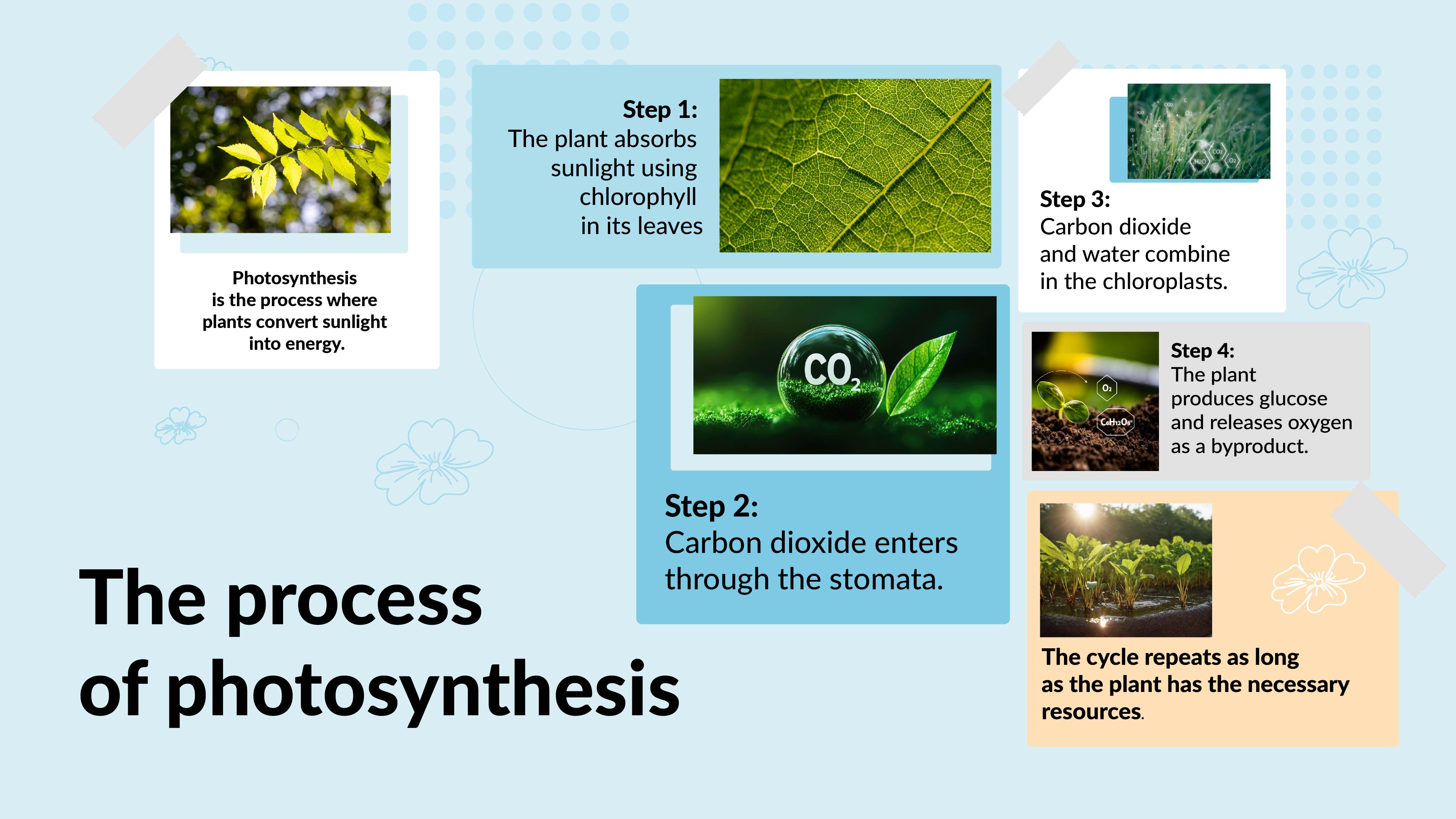
Storyboards can be a great tool for students, helping them organize complex ideas into a structured, visual format. Here’s a storyboard example for a biology project on photosynthesis.
Example: Photosynthesis process storyboard
First Frame: Show the sun shining on a plant with the caption: “Photosynthesis is the process where plants convert sunlight into energy.”
Second Frame: A close-up of chloroplasts in the leaves, with the text: “Step 1: The plant absorbs sunlight using chlorophyll in its leaves.”
Third Frame: Visualize carbon dioxide entering the stomata. The caption: “Step 2: Carbon dioxide enters through the stomata.”
Fourth Frame: Show carbon dioxide combining with water in the chloroplasts. “Step 3: Carbon dioxide and water combine in the chloroplasts.”
Fifth Frame: Illustrate the formation of glucose and oxygen. “Step 4: The plant produces glucose and releases oxygen as a byproduct.”
Sixth Frame: Recap the entire process visually, summarizing how sunlight, water, and carbon dioxide create energy. “The cycle repeats as long as the plant has the necessary resources.”
Why it’s effective: This storyboard example for students helps them visually organize complex biological processes, improving their storytelling and communication skills.
2. Storyboard examples for film
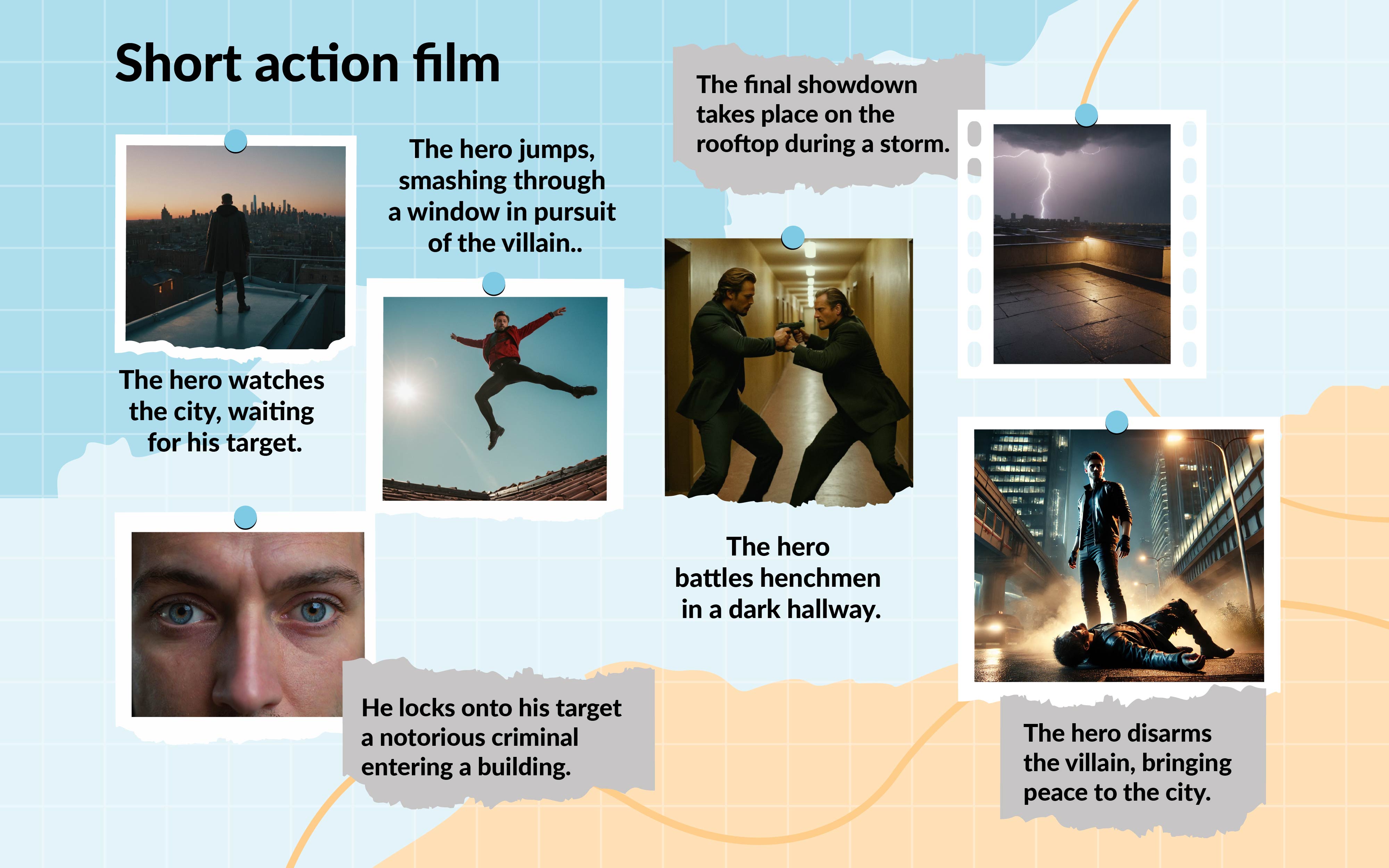
Filmmakers rely heavily on storyboards to map out scene-by-scene camera angles, character development, and the flow of events. Here’s a storyboard example for a short action film.
Example: Short action film storyboard
First Frame: A wide shot of the city skyline at dusk with the hero on a rooftop. Caption: “The hero watches the city, waiting for his target.”
Second Frame: A close-up of the hero’s eyes as he spots the villain. “He locks onto his target—a notorious criminal entering a building.”
Third Frame: Show the hero leaping from the rooftop in a low-angle shot. “The hero jumps, smashing through a window in pursuit of the villain.”
Fourth Frame: Visualize the fight scene in a narrow hallway, with dynamic camera movements. “The hero battles henchmen in a dark hallway.”
Fifth Frame: The climax on a rain-soaked rooftop as lightning flashes. “The final showdown takes place on the rooftop during a storm.”
Sixth Frame: A slow-motion sequence as the hero defeats the villain. “The hero disarms the villain, bringing peace to the city.”
Why it’s effective: This example emphasizes the use of camera angles, camera movements, and special effects to visually tell the story. It’s a great storyboard for pre-production in filmmaking.
3. Storyboard examples for websites
Storyboarding is also useful in website design. Here’s an example of a storyboard for a travel blog.
Example: Travel blog website storyboard
First Frame: The homepage with a large banner of a scenic destination. Caption: “Discover the World with [Blog Name]—Your Travel Companion for Adventure.”
Second Frame: Show the navigation menu with clear sections for Destinations, Tips, and Guides.“User-friendly navigation helps users explore destinations easily.”
Third Frame: A grid layout of popular travel destinations. “Destinations are displayed with photos and short descriptions.”
Fourth Frame: A blog post with a large image and a map. “Each blog post includes tips, maps, and recommendations.”
Fifth Frame: A newsletter subscription pop-up. “Engage users with a pop-up to subscribe for updates.”
Sixth Frame: The contact page with links to social media. “Users can easily follow on social media or contact the blogger.”
Why it’s effective: This storyboard helps in creating a visually appealing and user-friendly layout, ensuring a clear flow for website visitors.
4. Storyboard examples for business
Businesses use storyboards to create visually compelling presentations for product launches. Here’s an example for a business launching a new smart device.
Example: Business product launch storyboard
First Frame: Visualize the product with a bold caption: “Introducing the [Product Name]—Revolutionizing Home Automation.”
Second Frame: Show a customer persona struggling with home devices. “Meet Jane, who’s looking for a simpler way to control her home.”
Third Frame: Highlight product features using icons. “Control lights, security, and appliances from a single app.”
Fourth Frame: Show how it integrates into various environments. “Seamlessly integrates with any home setup.”
Fifth Frame: Present customer testimonials. “Hear from customers: ‘This device changed how I manage my home!’”
Sixth Frame: End with a call to action: “Pre-order now and experience smart living.”
Why it’s effective: This storyboard ensures that essential elements of the business presentation are visually communicated, helping to engage stakeholders and potential customers.
5. Storyboard examples for advertising
Here’s a storyboard example for an advertising campaign promoting eco-friendly shoes.
Example: Eco-friendly shoe ad storyboard
First Frame: A wide shot of a hiker wearing eco-friendly shoes in a forest. Caption: “Step into nature with [Brand Name].”
Second Frame: Close-up of the shoe’s recycled material. “Made from 100% sustainable materials.”
Third Frame: Show the shoes transitioning between city streets and nature. “Adaptable in both urban and natural environments.”
Fourth Frame: Present customer testimonials. “Customers love the comfort and sustainability.”
Fifth Frame: An infographic showing the environmental impact. “Each pair saves 10 plastic bottles from landfills.”
Sixth Frame: Call to action to buy online or in stores. “Join the movement: Step into a sustainable future.”
Why it’s effective: This storyboard organizes the advertising campaign into visually impactful frames, ensuring a clear and memorable message for consumers.
6. Storyboard examples for SaaS
SaaS companies use storyboards to onboard new users. Here’s an example for a project management tool.
Example: SaaS product onboarding storyboard
First Frame: Welcome screen introducing the tool. “Welcome to [Product Name], your all-in-one solution for project management.”
Second Frame: Show the dashboard layout. “Monitor all your projects in real-time from the dashboard.”
Third Frame: Adding a new project and assigning tasks. “Easily create new projects and assign tasks.”
Fourth Frame: Visualize collaboration tools like messaging and file sharing. “Collaborate seamlessly with real-time messaging and file sharing.”
Fifth Frame: Show reporting tools. “Track performance with detailed reports.”
Sixth Frame: Call to action to upgrade. “Upgrade to premium for advanced features.”
Why it’s effective: This storyboard helps users visualize the SaaS tool’s benefits, making it easier to onboard and engage users.
Frequently asked questions (FAQs)
1. What is the purpose of using a storyboard?
A storyboard allows you to create one visual plan that outlines the flow of a project in a chronological order. It’s used in creative industries like film and advertising for problem-solving, ensuring the right camera angles and transitions are well-planned. Whether you’re working on a cinematic project or successful advertising, storyboards can help communicate ideas clearly.
2. What are the 4 main styles of storyboards?
Traditional Storyboards: Hand-drawn, cinematic frames.
Thumbnail Storyboards: Small sketches for early layout and content planning.
Digital Storyboards:Online storyboarding tools to create polished visuals.
Animatics: Animated storyboard examples showing timing and duration.
3. What are the three main components of a storyboard?
Visual Frames: Illustrations showing key moments of the story.
Text Descriptions: Explains actions and features and benefits of each scene.
Camera Directions: Notes on right camera angles and timing for visual flow.
4. Are storyboards important?
Yes, storyboards are important because they help create visually appealing content for project and the preferences of various audiences. They also assist with problem-solving and are a crucial part of successful advertising, enabling creators to map out their original ideas and share them with teams.
5. What should be included in a storyboard?
A storyboard should include the visual part of the story, such as sketches of key moments, along with text notes that explain the action, dialogue, and camera directions. Features and benefits of each frame, like timing, movement, and transitions, may be included to create a cohesive visual flow.
Why Prezent is the best platform for creating storyboards?
Prezent is a powerful online tool that allows users to create visually dynamic and interactive storyboards through presentations. Here’s why Prezent stands out:
Interactive visuals: Create visually engaging storyboards with zoom, animations, and transitions.
Collaboration: Allows users to share storyboards with team members, making it easy to review and revise your storyboard.
Templates: Prezent offers a variety of storyboard templates, making it easy for both beginners and professionals to create storyboards quickly.
Visually appealing presentations: Turn your storyboards into visually appealing presentations that are ideal for stakeholders and clients.
Whether you’re a student, filmmaker, marketer, or SaaS company, storyboards are an essential part of the creative process. They help organize and visualize complex ideas, ensuring that every part of your storyboard is clear and effective. Using tools like Prezent can take your storyboard creation to the next level, providing dynamic and interactive features that make your presentations stand out. Start your free trial account and begin creating your storyboard or connect with our experts to get a demo of how it should be done.
What is an AI presentation maker? Capabilities, limitations & use cases
Cut deck time by 80% with AI presentation makers. This enterprise guide covers must-have features, proven ROI, and a PowerPoint comparison, plus real-world use cases for proposals, QBRs, and RFPs.
Best Canva alternatives: AI presentation tools from free to enterprise
Looking for a Canva alternative for presentations? Compare AI tools, free and paid plans, workflows, and features across small business and enterprise platforms.
7 Best Google Slides alternatives: Best presentation software for business teams
Google Slides alternatives ranked for business. Compare AI presentation tools, enterprise features, pricing, and collaboration options to find the right fit for your team.
14 Best Visme alternatives: Free, AI-powered, and enterprise presentation tools compared
14 Best Visme alternatives: Compare 14 AI presentation platforms like Prezent, Canva, and Piktochart by pricing, templates, storytelling, and content creation features.
Best Slideshow Presentation Software in 2026: Tested & Reviewed
Find the best slideshow presentation software for 2026. We tested top presentation apps including PowerPoint, Google Slides, and Prezent AI to create slideshows.
14 Best AI presentation makers: Comparing pricing, advantages, and real use cases
Compare the best AI presentation makers, including Prezent, Gamma, Canva, and Beautiful.ai. Review pricing, advantages, limitations, and PowerPoint export performance to choose the right tool.
NotebookLM review: Enterprise guide to Google NotebookLM AI features
NotebookLM review: I reveal the best Google NotebookLM features for business. Turn messy docs into battlecards & presentations with safe, citation-backed AI.





.png)








