Last Updated :
April 14, 2025
Pooja Dasar

What is the communication matrix, and why does every company need it?

Explore the communication matrix, its templates, and styles in project management. Learn how to manage stakeholders, tasks, and deadlines effectively.
colleagues discussing on communication matrix

Clear and effective communication is what keeps a business running smoothly. But let’s be real—many teams deal with mixed messages, misalignment, and unnecessary slowdowns just because communication isn’t crystal clear. That’s where a communication matrix comes in. It helps cut through the chaos, making sure the right people get the right information at the right time. Think of it as a roadmap for communication. It defines who needs to know what, when they need to know it, and how the information should be delivered. Without it, teams risk working in silos, missing critical updates, or wasting time on endless back-and-forths. A well-structured matrix brings clarity, accountability, and efficiency to every conversation. Whether it’s keeping projects on track, aligning leadership, or making presentations hit harder, a solid communication structure changes the game. In this article, we’ll break down what a communication matrix is, why it matters, and how it can level up the way your business communicates.

What is a communication matrix in business?

The communication matrix is a cheat sheet for how information flows within an organization. A communication matrix keeps workflows clear and organized for remote teams or fast-moving projects. Small businesses benefit from its structure, helping them make efficient use of limited resources as it maps out:

  • Stakeholders: Who needs to communicate? Who should be in the loop?
  • Message type: What information needs to be shared?
  • Frequency: When and how often should communication happen?
  • Communication channel: Which channels are most effective?

This removes the guesswork and prevents misalignment by establishing a clear, repeatable process for how information should move within a company.

Why a communication matrix is worth it

Do we need a structured process for something as basic as communication?

Yes. And here’s why:

  • Less noise, more focus: People get bombarded with emails, Slack messages, and notifications, so it's essential to avoid communication overload. A communication matrix cuts through the noise by defining what’s important and who needs to know it, enhancing faster decision-making across different teams.
  • Decisions without the guesswork: Using the matrix, leaders have access to the right information at the right time, and they can make decisions quicker with more confidence, improving overall decision-making.
  • Teams that actually stay in sync: Cross-functional teams work better together when communication is structured and predictable. Essential information reaches all the teams at the right time.
  • Fewer mistakes: Miscommunication can lead to duplicated efforts, missed deadlines, and costly errors. A communication matrix minimizes mistakes in meeting project goals and objectives.

But a structured communication process isn’t just about what is communicated—it’s also about how. Not everyone communicates the same way, and understanding different communication styles can make interactions more effective.

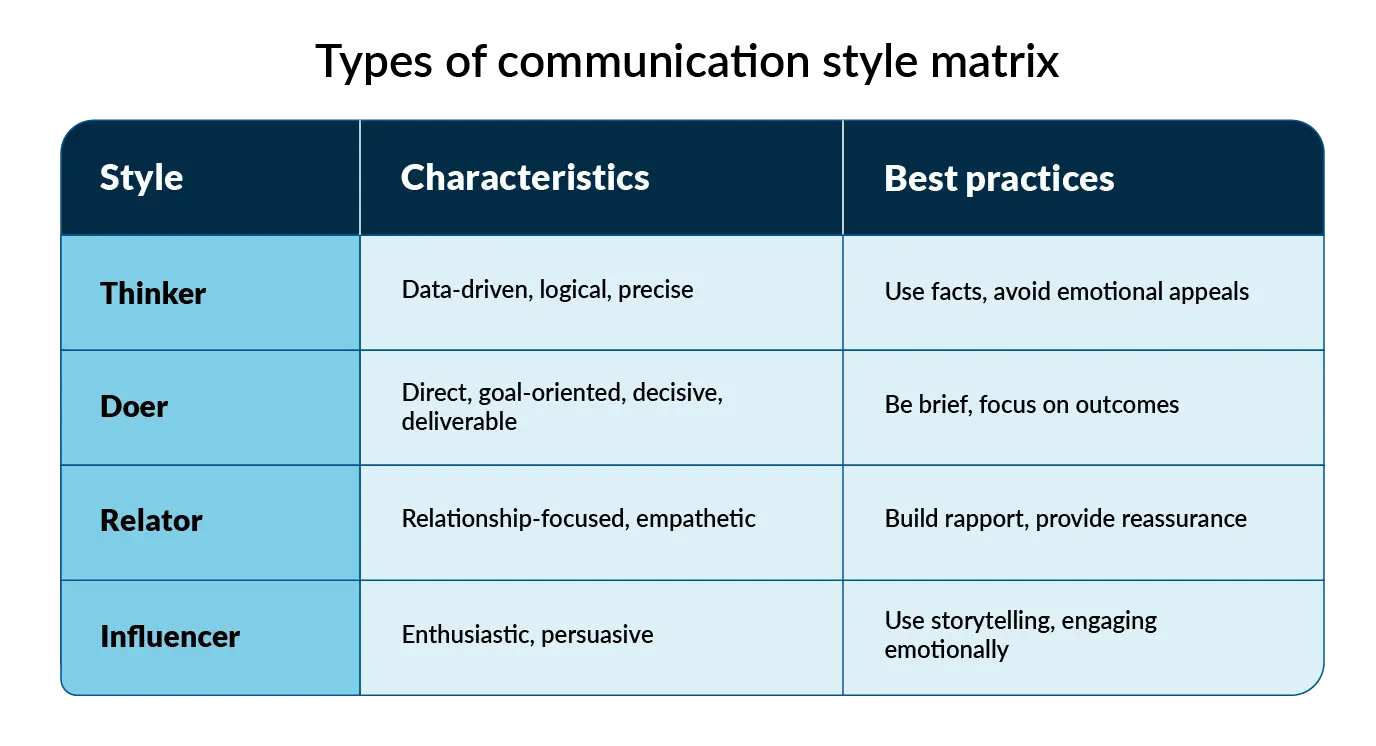
A communication style matrix helps teams tailor their messaging based on how people process information. Here’s a breakdown:

For example, a sales team using a communication matrix to guide their outreach can also adjust their messaging based on these styles:

  • For an analytical CEO: Focus on ROI, industry benchmarks, and hard data.
  • For an expressive founder: Effective employee engagement is key to driving success, so Highlight the vision, mission, and storytelling.

The same applies to internal communication across departments, project updates, and even presentations. Tools like Prezent’s Communication Fingerprint feature take this a step further by helping teams understand their colleagues’ communication and presentation styles. This ensures that every interaction—whether an email, a meeting, or a pitch deck—resonates with the audience and delivers real impact.

By combining a structured communication matrix with an awareness of communication styles, businesses can eliminate guesswork, build stronger connections, and make every message count.

Common challenges faced in organizations without a communication matrix.

Without a structured communication framework, here’s what businesses often run into:

  • Mixed messages: One team says one thing, and another says something completely different. When communication isn’t aligned, confusion spreads inside and outside the company.
  • Endless meetings and emails: People get looped into conversations that don’t actually concern them. Yet, somehow, people still don’t have the information they need. A lack of structure means more back-and-forth and less actual progress.
  • Missed opportunities: When teams only communicate within their own departments, the bigger picture gets lost. Without structured cross-functional communication, great ideas never leave the team, collaboration suffers, and business growth slows down.
  • Employee confusion: Teams aren’t sure who to go to for certain types of information across different departments. This leads to repeated questions, delays, misunderstandings, and duplicate work that could have been avoided. It can be minimized by implementing a stakeholder communication matrix.

Types of communication matrices: Sample templates

Different business scenarios call for different communication structures, and creating a communication matrix is essential for clarity. Here are some of the most common types of communication matrix structures and how they help streamline operations, addressing different roles such as the project sponsor, the manager, or the project team.

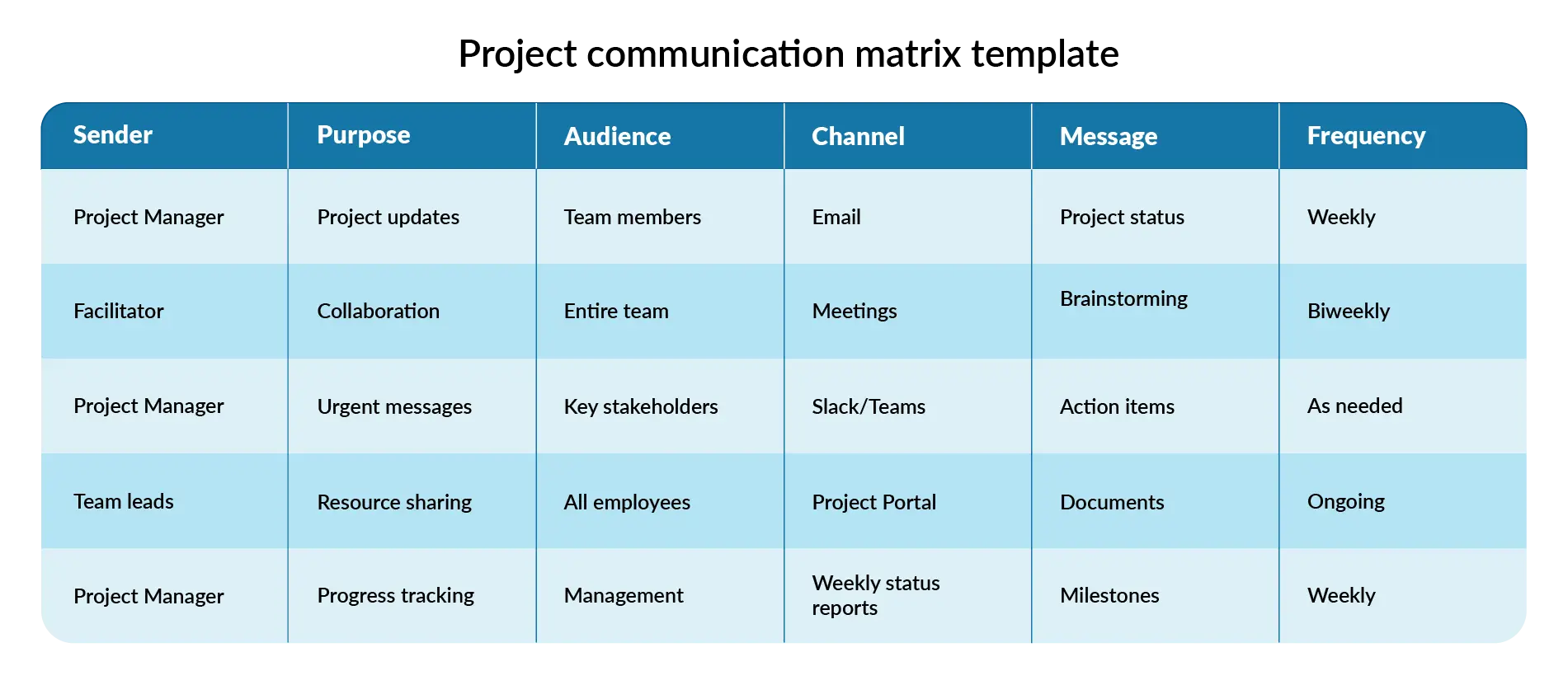
Project communication matrix

Large-scale project management comes with countless moving parts, making clear communication essential. A project communication matrix ensures that all stakeholders and the project team stay aligned by delivering the right updates to the right people—without unnecessary meetings or lost messages.

Prezent can take it a step further by helping teams craft clear, concise, and compelling project-related presentations—so that every stakeholder stays aligned without unnecessary back-and-forth. Access over 35k+ brand-approved slide designs to quickly build presentations that align with corporate standards.

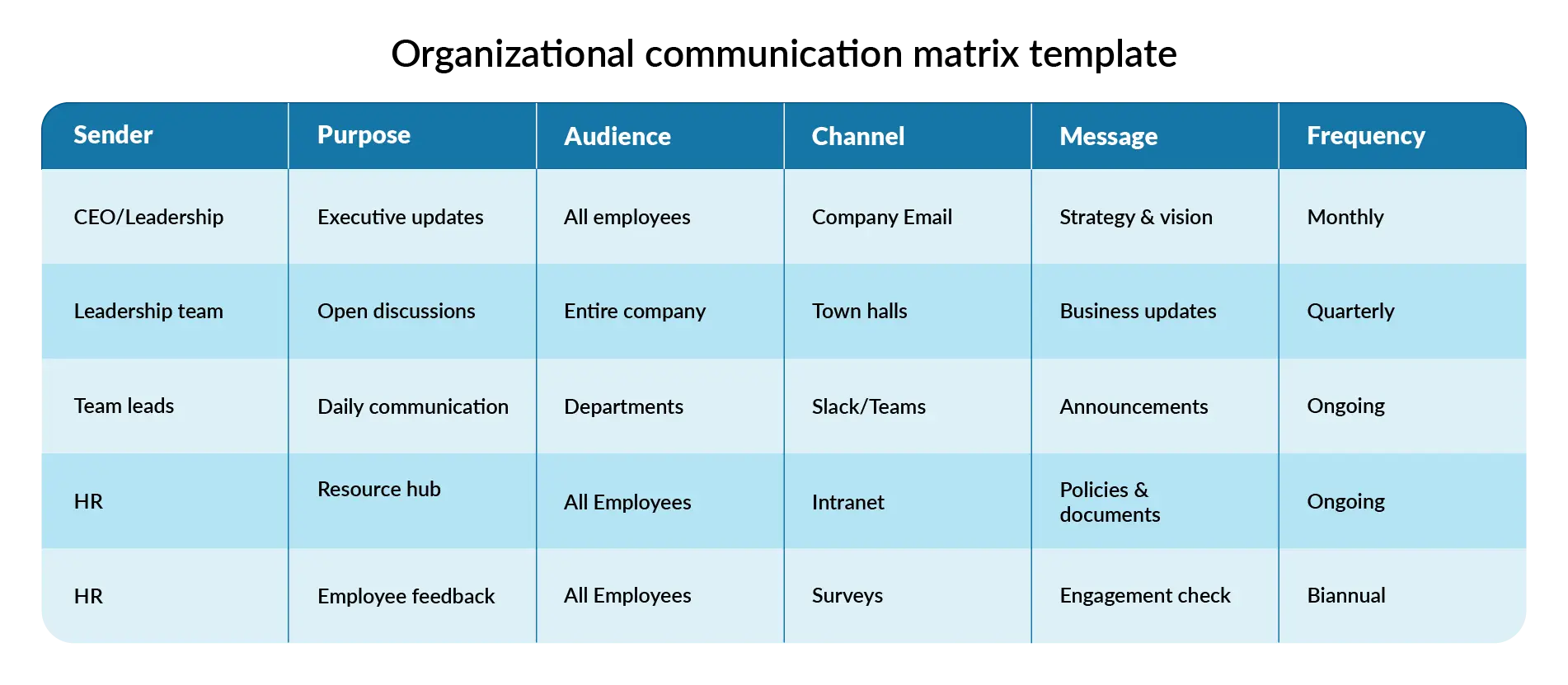
Organizational communication matrix

A company’s internal communication can make or break efficiency. A communication matrix helps businesses establish a clear, structured flow of information, ensuring employees stay informed, engaged, and aligned with company goals. When communication is seamless, teams work better, company culture strengthens, and confusion takes a back seat.

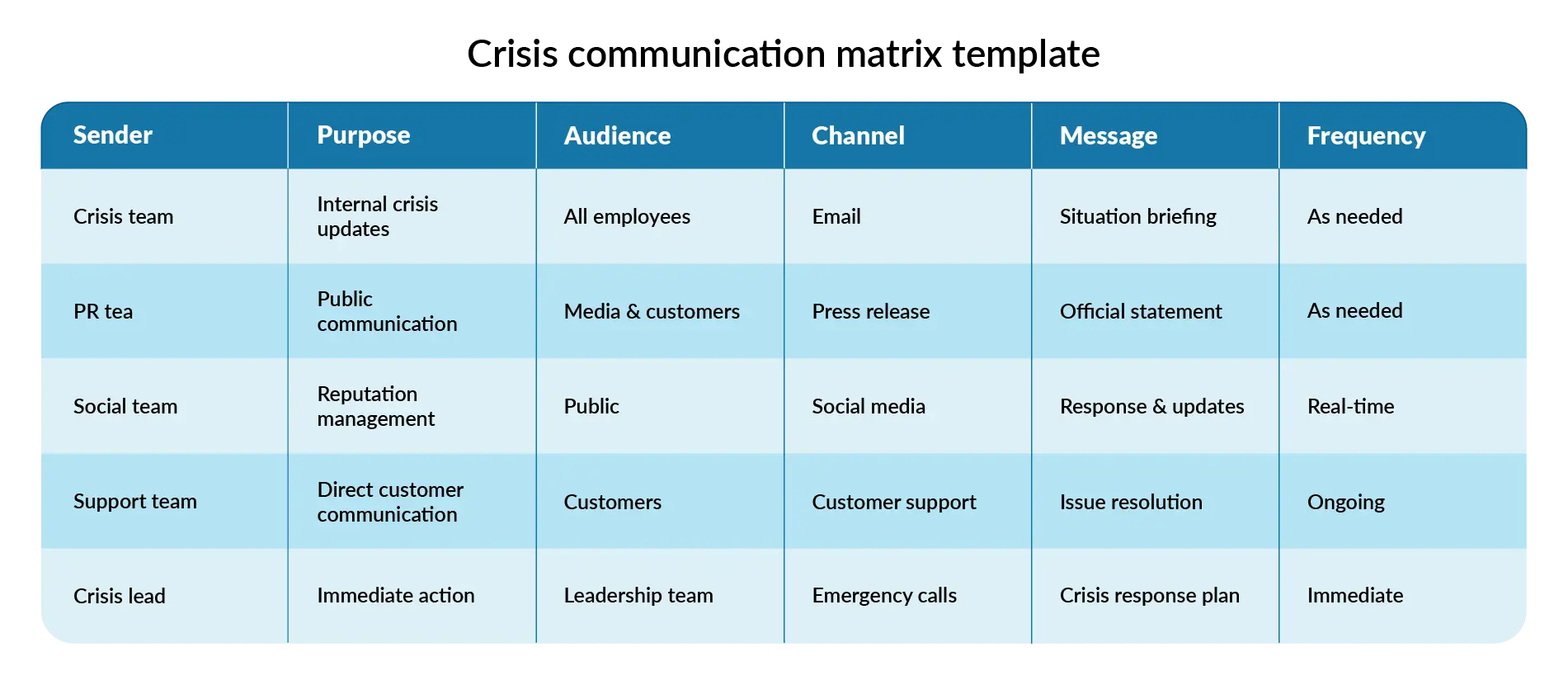
Crisis communication matrix

In a crisis, miscommunication can escalate problems quickly. This matrix ensures teams react quickly and consistently. Communication is critical whether it’s a PR issue, security breach, or operational failure.

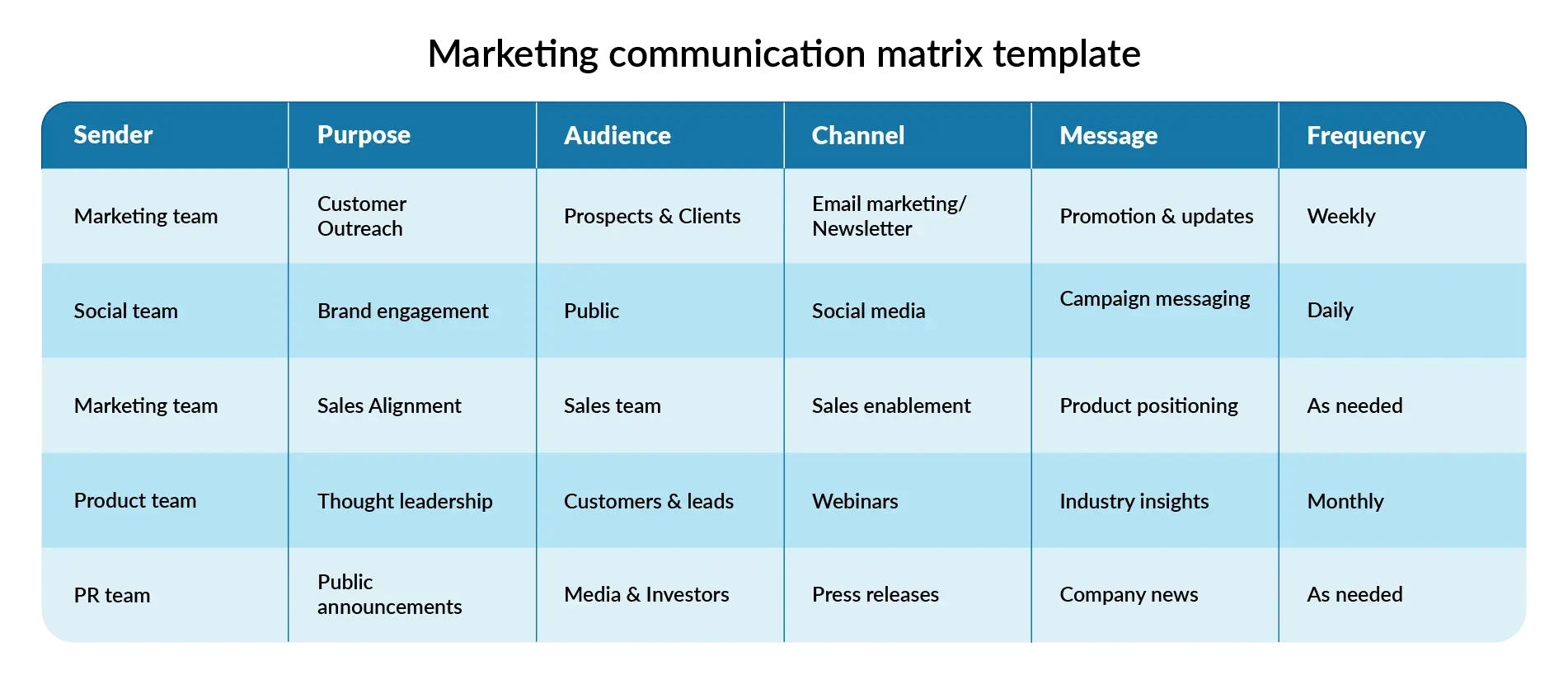
Marketing communication matrix

For marketing teams, consistency is key. This matrix ensures messaging aligns across channels and teams.

Communication matrix and presentations: Craft with Prezent

Presentations are a key part of business communication, whether you're pitching an idea, sharing performance results, or training employees. A communication matrix ensures they are structured, relevant, and impactful.

  • Audience-centric messaging: A well-defined matrix helps customize content for different stakeholders. Executives need a high-level strategy, while employees look for actionable takeaways.
  • Consistent branding & messaging: When multiple teams contribute to presentations, consistency can slip. A communication matrix keeps everything aligned with company standards and enhances the communication plan.
  • Streamlined collaboration: When teams work on presentations together, messaging can become inconsistent. A communication matrix keeps information structured.

Prezent takes presentation structure to the next level. Here are the amazing features for you to ease the process of creating a presentation:

  • AI-powered efficiency: Create hyper-personalized, on-brand presentations in minutes with Prezent’s Auto generator feature, reducing manual work.
  • Expert-curated storylines: Access 1,000+ structured storylines tailored for different business scenarios to craft compelling presentations.
  • Brand consistency instantly: Convert any slide deck into a brand-compliant template effortlessly, ensuring uniformity across all materials.
  • Sharpen communication skills: Improve business storytelling with bite-sized courses designed to make you a more impactful communicator.
  • Personalization: Craft presentations that match your audience's communication style. The Communication Fingerprint feature helps you know your audience better and personalize the presentation.

Explore more features of Prezent, book a free trial with our experts, or schedule a demo today.

Ready to create impactful presentations?

Try for free
No items found.
No items found.

Related resources

BLOG
Supriya Sarkar
April 1, 2026
The best B2B AI tools for enterprise teams: Features, pros and cons, pricing, and use cases
Find the best B2B AI tools for enterprise teams. Evaluate features, pricing, pros and cons, and use cases to choose tools that fit your workflows and deliver measurable impact.
BLOG
Niyati Mahale
April 1, 2026
11 best Genspark AI alternatives I tested for 2026
This guide covers the best Genspark AI alternatives for content, SEO, and presentations. Compare features, pricing, and real-world usability to find the right tool.
BLOG
Supriya Sarkar
April 1, 2026
What is presentation software? A complete guide to how it works, what to look for, and how to choose the right one
What is a presentation software? This guide explains how it works, key features to look for, and how to choose the best presentation software.
BLOG
Supriya Sarkar
March 31, 2026
PopAI review: Complete breakdown of features, pricing, and alternatives
PopAI review: Is this AI tool right for business presentations? Explore features, pricing, limitations, and enterprise alternatives.
BLOG
Niyati Mahale
March 27, 2026
Microsoft Copilot review for presentations: features, pricing & limitations
Explore Microsoft Copilot’s features, pricing, and limitations for presentations. See how it performs and whether it fits your workflow.
BLOG
Niyati Mahale
March 27, 2026
Adobe Review (2026): Is Adobe InDesign Worth It for Business Use?
This Adobe review evaluates Adobe InDesign’s features, pricing, and usability. See how it performs for business workflows and where it falls short.
BLOG
Niyati Mahale
March 27, 2026
Best AI Pitch Deck Generators in 2026 (Tested & Reviewed)
I tested the best AI pitch deck generators to see which tools actually help you build clear, structured, and convincing pitch decks faster.
BLOG
Supriya Sarkar
March 26, 2026
10 Best PopAI alternatives: Compare features, AI capabilities, pricing, and free plans
Find the best PopAI alternatives and AI presentation makers. Compare AI features, pricing, and free plans to create smarter, more professional presentations.
BLOG
Niyati Mahale
March 27, 2026
Best Plus AI Alternatives in 2026: Top 8 AI Presentation Tools
I tested the best Plus AI alternatives to see which tools actually create presentation-ready decks. Here are the top AI presentation tools worth using in 2026.
BLOG
Supriya Sarkar
March 27, 2026
Nano Banana review: Evaluating strengths, workflow gaps, and AI solutions for enterprise presentations
Nano Banana review for enterprise presentations. Explore visual strengths, identify workflow gaps, and see how teams use AI to build faster, executive-ready presentations.
BLOG
Niyati Mahale
March 27, 2026
11 Best SlideShare Alternatives for Sharing Presentations
Explore the best SlideShare alternatives for creating and sharing presentations. Compare tools for hosting, collaboration, design, and presentation analytics.
BLOG
Niyati Mahale
March 23, 2026
Beautiful.ai Review (2026): Features, Pricing, Pros & Cons
An in-depth Beautiful.ai review covering features, pricing, pros, and limitations to help you decide if it’s the right presentation tool for your needs.
Free 14-Day Trial*

Customized On-Boarding*