blog
March 24, 2022
Rajat Mishra

How to dodge bullet (points)

Creating sparkling business presentations requires us to go beyond just the graphics and visuals.

The ubiquitous bullet points

More than 30 million presentations are made every day and more than 90% of them are slide after slide of bullet points. Why is that?

Bullet points are the easiest and fastest way to create content in presentation software. They are also a natural extension of long-form (document) communication.

But bullet points suck!

The common argument (Garr Reynolds) against bullet points is that they are not visual. And since we are visual learners bullet points are easy to forget. Which is true, but not the whole truth!

The hidden issue

Another insidious, less obvious problem with bullet points is logical. When our brains notice the bullet point layout, we assume it is one of two logical arguments: Inclusion or Sequence.

  • Inclusion: all bullet points are part of one logical category. (E.g., Seven wonders of the world, Policies in a state program, results of a financial quarter)
  • Sequence: all bullet points are in order (E.g., seven steps to cook a recipe, chronological events that led to WWI)

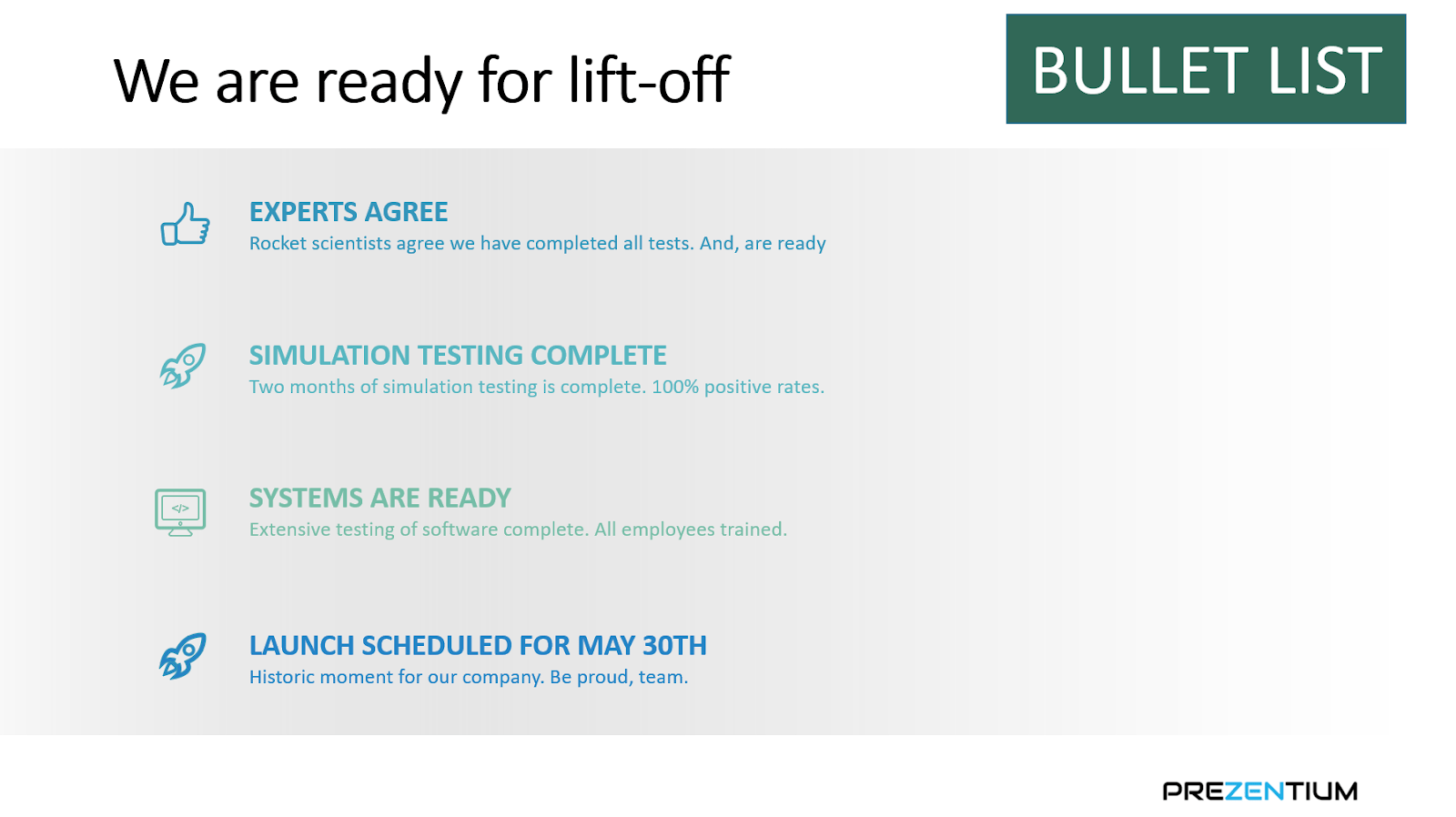
However, we confuse our brains by incorrectly using bullet points to communicate other logical arguments. Here's an example:

Pow


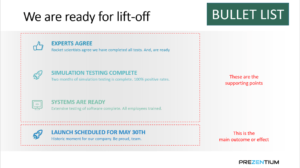
This issue with the slide above is that the brain processes the bullet point layout as all four points live in the same category or in sequence. Neither is the case here.

The first three bullets are supporting points. And the last bullet is the main outcome or effect that the first three bullet points helped with.

Causality is the right logical argument here. And tthe bullet points layout conflicts with it.

The meaning would become clearer if we used a layout more conducive to causality. In the picture below, it becomes easier for the brain to process that the first three bullet points lead to the outcome on the right.

How to dodge bullets?

So, creating sparkling business presentations requires us to go beyond graphics and visuals. We must think about the logical argument or meaning we are trying to communicate. And choose the right layout that goes with the argument.

If it is inclusion or sequence, then bullet points work great. If you are trying to communicate a different logical argument (e.g., causality, convergence), you must dodge bullets!

Ready to create impactful presentations?

Try for free
No items found.
No items found.

Related resources

BLOG
Tony Colon
March 11, 2026
Why I am joining Prezent AI’s senior executive board: Empowering storytelling in the age of AI
Tony Colon shares how his career shaped his belief in clear communication and why he chose to support Prezent AI’s mission.
BLOG
Supriya Sarkar
March 10, 2026
Claude for PowerPoint: How it works, setup, limitations, and enterprise solutions
Claude for PowerPoint guide: learn step-by-step setup, AI presentation creation, workflow best practices, and the limitations enterprise teams should consider.
BLOG
Supriya Sarkar
March 2, 2026
How to choose the best AI presentation maker: A practical buyer’s guide for modern teams
Find the best AI presentation maker for your team. Learn how to compare AI presentation generators, templates, brand control, and integrations before choosing the right tool.
BLOG
Anoob PT
March 2, 2026
What is an AI presentation maker? Capabilities, limitations & use cases
Cut deck time by 80% with AI presentation makers. This enterprise guide covers must-have features, proven ROI, and a PowerPoint comparison, plus real-world use cases for proposals, QBRs, and RFPs.
BLOG
Anoob PT
February 26, 2026
Best Canva alternatives: AI presentation tools from free to enterprise
Looking for a Canva alternative for presentations? Compare AI tools, free and paid plans, workflows, and features across small business and enterprise platforms.
BLOG
Anoob PT
February 24, 2026
7 Best Google Slides alternatives: Best presentation software for business teams
Google Slides alternatives ranked for business. Compare AI presentation tools, enterprise features, pricing, and collaboration options to find the right fit for your team.
BLOG
Supriya Sarkar
February 20, 2026
14 Best Visme alternatives: Free, AI-powered, and enterprise presentation tools compared
14 Best Visme alternatives: Compare 14 AI presentation platforms like Prezent, Canva, and Piktochart by pricing, templates, storytelling, and content creation features.
BLOG
Anoob PT
February 18, 2026
Prezent AI Expands Senior Executive Board with CX Leader Tony Colon
Tony Colon joins Prezent AI’s Senior Executive Board to advance global enterprise adoption and customer-centric AI innovation.
BLOG
Anoob PT
February 16, 2026
Prezent vs Gamma: Which AI presentation tool is best for your business?
Choosing between Prezent vs Gamma? Compare features, pricing, ROI, and brand control to find the right AI presentation tool for your team.
BLOG
Anoob PT
February 10, 2026
Best Slideshow Presentation Software in 2026: Tested & Reviewed
Find the best slideshow presentation software for 2026. We tested top presentation apps including PowerPoint, Google Slides, and Prezent AI to create slideshows.
BLOG
Surbhi Dubey
February 10, 2026
Must-Attend Biopharma Conferences of 2026
Discover the top biopharma conferences of 2026, including partnering, oncology, advanced therapies, and AI leadership events like Articulate.
BLOG
Anoob PT
February 6, 2026
14 Best AI presentation makers: Comparing pricing, advantages, and real use cases
Compare the best AI presentation makers, including Prezent, Gamma, Canva, and Beautiful.ai. Review pricing, advantages, limitations, and PowerPoint export performance to choose the right tool.
Free 14-Day Trial*

Customized On-Boarding*